


A Raspberry Pi smart thermostat reads temperature from a DHT22 or DS18B20 sensor, switches an HVAC relay via GPIO, and serves a local web interface for setpoint control. This guide covers the wiring, the Bookworm-compatible software stack, the Python control loop with hysteresis, and a Flask-based web UI for remote adjustment. No cloud account required.
Last tested: Raspberry Pi OS Bookworm Lite 64-bit | May 2025 | Raspberry Pi 4 Model B (4GB) | Python 3.11, Flask 3.0, gpiozero 2.0, MariaDB 10.11
Key Takeaways
- The DHT22 data pin requires a 10k pull-up resistor to 3.3V. Omitting it causes intermittent read failures that look like a software problem but are a wiring problem. The DS18B20 has the same requirement. Wire the resistor before writing a single line of code.
- Use gpiozero instead of RPi.GPIO. RPi.GPIO is not deprecated but gpiozero is the current recommended library on Bookworm and its
OutputDeviceclass handles relay control with less boilerplate and cleaner error handling. - Most 3-channel relay modules are active-LOW. Setting the GPIO pin HIGH turns the relay OFF. Setting it LOW turns it ON. Get this backwards and your HVAC runs continuously. Test each relay channel with a multimeter before wiring to HVAC terminals.
Hardware and Wiring for a Raspberry Pi Smart Thermostat
The minimum hardware for a functional Raspberry Pi smart thermostat: a Pi 4 or Pi 5, a DHT22 or DS18B20 temperature sensor, a 3-channel relay module, and 18 AWG solid copper wire for the HVAC connections. A 1602 LCD or the official 7-inch touchscreen handles local display if needed, but the Flask web interface covers that from any browser on the same network.
Hardware list: Raspberry Pi 4 (2GB minimum) or Pi 5. 5V/3A USB-C PSU (Pi 4) or 5V/5A USB-C PSU (Pi 5). DHT22 sensor plus one 10k resistor, or DS18B20 sensor plus one 4.7k resistor. 3-channel relay module (SainSmart or equivalent). Female-to-male jumper wires. 18 AWG solid copper wire for HVAC terminals. microSD card, 16GB minimum.
DHT22 wiring: VCC to Pi 3.3V (pin 1). GND to Pi GND (pin 6). DATA to GPIO4 (pin 7). Place the 10k pull-up resistor between VCC and DATA. The DHT22 runs on 3.3V or 5V. Use 3.3V on the Pi to avoid any level-shift risk on the data line.
DS18B20 wiring (alternative): VCC to 3.3V. GND to GND. DATA to GPIO4. Place the 4.7k pull-up resistor between VCC and DATA. The DS18B20 uses the 1-Wire protocol, which requires enabling the 1-Wire interface in raspi-config before it will appear in /sys/bus/w1/devices/.
Relay module wiring: VCC to Pi 5V (pin 2). GND to Pi GND. IN1 to GPIO17 (heating). IN2 to GPIO27 (cooling). IN3 to GPIO22 (fan). The relay COM and NO (normally open) terminals connect between the HVAC control board and its R (24V power), Y (cooling), G (fan), and W or O (heat) terminals. Disconnect power to the HVAC system before wiring relay terminals.

Expected result: With the relay module powered and GPIO pins set to HIGH (their default state on boot), all three relay channels should be open (HVAC off). Confirm with a multimeter across each relay’s COM and NO terminals before connecting HVAC wiring. You should read open circuit on all three channels.
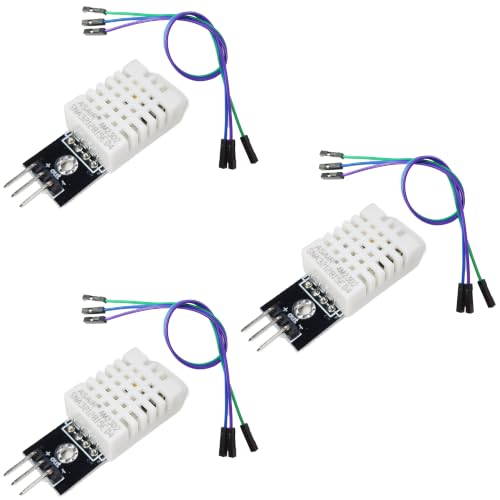
- BUILT-IN MODULE DESIGN: Unlike bare DHT22 sensors, this module includes a filtering capacitor and pull-up resistor on th…
- HIGH ACCURACY MEASUREMENTS: Measures temperature from -40 to +80 degrees C (plus or minus 0.5 degree accuracy) and humid…
- COMES WITH CONNECTING CABLE: Includes a pre-wired cable for direct connection to your microcontroller; simply plug in an…

- Wide Temperature Range: Measures temperatures from -10°C to 85°C, suitable for various indoor and outdoor applications.
- Compatible with Sonoff TH10/16 and Compatible with Tasmota firmware for temperature sense.
- Reliable Sensor: Uses DS18-B20 module for accurate and stable temperature readings with high precision.

- Powerful Performance: The Pi 4B Model B Development Board features a Broadcom BCM2711, quad-core Cortex-A72 (ARM v8) 64-…
- Versatile Multimedia Capabilities: Equipped with 2x micro HDMI ports (up to 4Kp60), 2-lane MIPI DSI display port, and 2-…
- Enhanced Connectivity: With 2.4 GHz and 5.0 GHz IEEE 802.11b/g/n/ac wireless, Bluetooth 5.0, and Gigabit Ethernet, the P…
Setting Up the Software Stack
Flash Raspberry Pi OS Bookworm (64-bit) using Raspberry Pi Imager. Set hostname, username, password, and WiFi credentials in the Imager advanced settings before writing. Do not use the legacy wpa_supplicant.conf method. After first boot, update before installing anything:
sudo apt update && sudo apt full-upgrade -yInstall system packages and create a Python virtual environment for the thermostat project:
sudo apt install -y python3-venv python3-pip mariadb-server git
python3 -m venv ~/thermostat-env
source ~/thermostat-env/bin/activate
Install Python libraries inside the virtual environment:
pip install flask gpiozero adafruit-circuitpython-dhtFor DS18B20 sensors, enable the 1-Wire interface:
sudo raspi-config nonint do_onewire 0Set up the MariaDB database for temperature logging:
sudo systemctl enable --now mariadb
sudo mariadb -u root <<EOF
CREATE DATABASE thermostat;
CREATE USER 'piuser'@'localhost' IDENTIFIED BY 'changeme';
GRANT ALL ON thermostat.* TO 'piuser'@'localhost';
USE thermostat;
CREATE TABLE readings (
  id INT AUTO_INCREMENT PRIMARY KEY,
  temperature FLOAT,
  humidity FLOAT,
  ts TIMESTAMP DEFAULT CURRENT_TIMESTAMP
);
EOF
Store credentials in a .env file and set permissions:
echo "DB_PASS=changeme" > ~/thermostat-env/.env
chmod 600 ~/thermostat-env/.env
Expected result: mariadb -u piuser -p thermostat connects and shows the readings table. The virtual environment activates without errors. python3 -c "import flask, gpiozero; print('OK')" returns OK.
Control Logic and Hysteresis
The control loop reads the sensor on a fixed interval, compares the current temperature to the setpoint, and switches relay channels accordingly. Without hysteresis, the relay toggles every few seconds as the temperature oscillates around the setpoint. A 0.5°C deadband prevents that. The HVAC does not turn on unless the temperature is more than 0.5°C outside the setpoint, and does not turn off until it returns within 0.5°C.
import time
import board
import adafruit_dht
from gpiozero import OutputDevice

HEAT_PIN = OutputDevice(17, active_high=False, initial_value=False)
COOL_PIN = OutputDevice(27, active_high=False, initial_value=False)
FAN_PIN  = OutputDevice(22, active_high=False, initial_value=False)

sensor   = adafruit_dht.DHT22(board.D4)
SETPOINT = 21.0   # degrees C
DEADBAND = 0.5

def read_sensor():
    try:
        return sensor.temperature, sensor.humidity
    except RuntimeError:
        return None, None

while True:
    temp, hum = read_sensor()
    if temp is not None:
        if temp < SETPOINT - DEADBAND:
            HEAT_PIN.on()
            COOL_PIN.off()
            FAN_PIN.on()
        elif temp > SETPOINT + DEADBAND:
            COOL_PIN.on()
            HEAT_PIN.off()
            FAN_PIN.on()
        else:
            HEAT_PIN.off()
            COOL_PIN.off()
            FAN_PIN.off()
    time.sleep(30)
active_high=False on the OutputDevice constructor handles the active-LOW relay logic. Calling .on() pulls the GPIO pin LOW, which energizes the relay. Calling .off() pulls it HIGH, which opens the relay. This matches standard 3-channel relay module behavior without inverting logic manually in the application code.
Run the control loop as a systemd service so it restarts on reboot:
sudo tee /etc/systemd/system/thermostat.service <<EOF
[Unit]
Description=Pi Thermostat Control Loop
After=network.target

[Service]
User=pi
WorkingDirectory=/home/pi
ExecStart=/home/pi/thermostat-env/bin/python3 /home/pi/thermostat.py
Restart=always
RestartSec=10

[Install]
WantedBy=multi-user.target
EOF

sudo systemctl enable --now thermostat
Expected result: systemctl status thermostat shows active (running). Relay clicks are audible within 30 seconds if the room temperature is outside the deadband. journalctl -u thermostat -f shows live sensor output.
Web Interface and Remote Access
Flask serves a minimal web interface on port 5000 that displays the current temperature, humidity, and setpoint, and accepts a new setpoint via a form POST. This is a local-network interface. Expose it to the internet only through a reverse proxy with authentication. For a production-ready reverse proxy setup, see Traefik on Raspberry Pi with Docker and Wildcard Certs.
from flask import Flask, render_template, request, redirect
import threading, time, board, adafruit_dht
from gpiozero import OutputDevice

app = Flask(__name__)
state = {'temp': None, 'hum': None, 'setpoint': 21.0}

HEAT = OutputDevice(17, active_high=False, initial_value=False)
COOL = OutputDevice(27, active_high=False, initial_value=False)
FAN  = OutputDevice(22, active_high=False, initial_value=False)
sensor = adafruit_dht.DHT22(board.D4)
DEADBAND = 0.5

def control_loop():
    while True:
        try:
            t = sensor.temperature
            h = sensor.humidity
            state['temp'] = t
            state['hum']  = h
            sp = state['setpoint']
            if t < sp - DEADBAND:
                HEAT.on(); COOL.off(); FAN.on()
            elif t > sp + DEADBAND:
                COOL.on(); HEAT.off(); FAN.on()
            else:
                HEAT.off(); COOL.off(); FAN.off()
        except RuntimeError:
            pass
        time.sleep(30)

threading.Thread(target=control_loop, daemon=True).start()

@app.route('/', methods=['GET', 'POST'])
def index():
    if request.method == 'POST':
        state['setpoint'] = float(request.form['setpoint'])
        return redirect('/')
    return render_template('index.html', state=state)

if __name__ == '__main__':
    app.run(host='0.0.0.0', port=5000)
Secure the local interface with UFW. Allow port 5000 only from your local subnet and restrict SSH:
sudo ufw allow from 192.168.1.0/24 to any port 5000
sudo ufw limit ssh
sudo ufw enable
For remote access outside the home network, Tailscale is the least-friction option and eliminates the need to open ports on the router. See Tailscale Raspberry Pi: Complete Secure Remote Access Guide for the full setup. For MQTT integration with Home Assistant, see Mosquitto MQTT Raspberry Pi: Complete TLS and ACL Security Guide.
Expected result: Navigating to http://[pi-hostname]:5000 from any browser on the local network shows current temperature, humidity, and a setpoint input. Submitting a new setpoint updates the control loop immediately. The UFW status shows port 5000 allowed from the local subnet only.
FAQ
Which temperature sensor is better for a Raspberry Pi smart thermostat: DHT22 or DS18B20?
DS18B20 for accuracy and wiring reliability. It uses 1-Wire protocol, reads consistently, and supports multiple sensors on one GPIO pin. DHT22 is easier to source and cheaper, but is prone to intermittent read failures if the pull-up resistor is absent or the polling interval is too short (minimum 2 seconds between reads). For a single-zone thermostat either works. For multi-zone with sensors in different rooms, use DS18B20.
Can a Raspberry Pi smart thermostat control a heat pump?
Yes, with the correct relay wiring. Heat pumps use an O or B wire for reversing valve control in addition to the standard R, Y, G, W terminals. Map each HVAC wire to its own relay channel. Confirm whether your heat pump uses O (energized in cooling) or B (energized in heating) for the reversing valve before wiring. The control logic needs a separate relay channel and a mode flag in the Python state to handle this correctly.
Why does the DHT22 return read errors intermittently?
Three causes: missing pull-up resistor, polling too frequently (DHT22 minimum interval is 2 seconds), or noise on the data line from a long wire run. The Adafruit CircuitPython DHT library raises a RuntimeError on failed reads. Wrap reads in try/except and retry after 2 seconds. If errors persist, verify the 10k pull-up is wired between VCC and the DATA pin, not between DATA and GND.
How do you prevent the relay from short-cycling the HVAC compressor?
Two mechanisms. First, the hysteresis deadband (0.5°C in the example above) prevents the relay from toggling on every sensor read. Second, add a minimum-off timer in the control loop: record the timestamp when the compressor relay opens, and do not allow it to close again until at least 3-5 minutes have elapsed. Short-cycling a compressor causes premature wear on the start capacitor and compressor motor. The fan relay has no such constraint.
Does wiring a custom thermostat void the HVAC warranty?
Potentially. Most HVAC manufacturers require professional installation of control components and may reject warranty claims if non-standard wiring is found. The relay module sits between the thermostat terminals and the control board, so it is electrically equivalent to any third-party smart thermostat. Check your HVAC documentation before installation. If warranty coverage matters, use the Pi thermostat in parallel with a commercial unit during testing rather than as the sole controller from the start.
References:
- gpiozero OutputDevice documentation: gpiozero.readthedocs.io
- Adafruit CircuitPython DHT library: github.com/adafruit/Adafruit_CircuitPython_DHT
- DS18B20 datasheet: analog.com
- Flask documentation: flask.palletsprojects.com
- Raspberry Pi Imager: raspberrypi.com/software
About the Author
Chuck Wilson has been programming and building with computers since the Tandy 1000 era. His professional background includes CAD drafting, manufacturing line programming, and custom computer design. He runs PidiyLab in retirement, documenting Raspberry Pi and homelab projects that he actually deploys and maintains on real hardware. Every article on this site reflects hands-on testing on specific hardware and OS versions, not theoretical walkthroughs.
Last tested hardware: Raspberry Pi 4 Model B (4GB). Last tested OS: Raspberry Pi OS Bookworm Lite 64-bit. Python 3.11, Flask 3.0, gpiozero 2.0, MariaDB 10.11.