
Raspberry Pi randomly reboots under load in ways that make you feel like you’re losing your mind. You didn’t touch anything. Nothing logged an error. One minute it’s serving data, the next it’s booting like nothing happened. I’ve watched this happen on media servers, Home Assistant boxes, and container hosts that looked totally fine five minutes earlier.
The Raspberry Pi is a single-board computer built around tight power, thermal, and I/O margins. Stability under sustained load depends far more on timing and overlap than on any single component. Before you blame the power supply and move on, slow down. These reboots usually come from stacked pressure points. Power draw spikes, storage pulls current at the wrong moment, the CPU ramps up, and the board quietly gives up. If you don’t understand those limits, you’ll keep fixing the wrong thing and wondering why nothing sticks.
Key Takeaways
- Raspberry Pi reboots under load are almost always stacked failures, not a single clean cause
- Power delivery failures are often transient and invisible to logs
- Heat, power, storage, and software pressure reinforce each other
- Run
vcgencmd get_throttledfirst, because it tells you whether the firmware already knows something is wrong - Common fixes fail because they treat one symptom while ignoring the others
- Some workloads exceed what this platform can sustain reliably and no amount of tuning changes that
What You Are Actually Seeing
Raspberry Pi random reboots under load rarely announce themselves. The board does not freeze with an error message. It simply resets. HDMI signal drops, network connections vanish, and a minute later the login prompt is back like nothing happened. That makes people assume software bugs or bad updates. It is usually neither.
In real deployments this shows up at specific moments. Media servers reboot when two streams start at once. Home Assistant restarts when backups run. Kubernetes nodes vanish when containers pull images. File servers reset during large transfers. Idle uptime looks great. Load uptime collapses.
Clean reboot versus hard reset
Some reboots look clean. The filesystem survives. Logs stop abruptly and resume after boot. Others are hard resets. The SD card complains. Databases need repair. The difference matters. Clean reboots often point to watchdog or kernel behavior. Hard resets lean toward power or thermal faults. Knowing which one you are dealing with narrows the field considerably before you start replacing hardware.
Why logs often mislead
Many users check logs and find nothing. That is not user error. Power-related resets do not give Linux time to write messages. Thermal shutdowns can cut power below the level needed for logging. Even kernel panics may never reach persistent storage. The system appears healthy. Temperatures look fine. Voltage warnings never appear. People start swapping SD cards or reinstalling operating systems, which feels productive but rarely changes the outcome.
The good news is the firmware often knows something happened even when the OS logs do not. More on that in the diagnosis section.
What “Under Load” Actually Means on a Pi
When people say a system is under load they usually mean CPU usage. That is part of it, but on a Raspberry Pi, CPU load is only one piece. The board shares power, memory, and bandwidth across components that all get cranky at the same time.
A Pi can sit at 20 percent CPU all day and look rock solid. Then you kick off a backup, start a container, or pull a media stream, and suddenly everything stacks up. CPU ramps. USB wakes up. Storage draws current. Network traffic spikes. None of those alone look scary. Together, they push the board into territory it was never built to love.
Short spikes are usually fine. A few seconds of high CPU or disk activity rarely cause trouble. The problems show up when bursts overlap or repeat. A database write hits while the CPU is already busy. A USB SSD spins up while Ethernet is saturated. These moments are brief but they hit hard. This is why synthetic stress tests lie to you. A single load does not represent real usage. Real workloads are messy, overlapping, and uneven.
Spoiler alert: a Pi that runs for months doing nothing proves exactly one thing. It can run for months doing nothing. The minute you ask it to behave like a tiny server, the rules change.
Root Cause: Power Delivery
Most Raspberry Pi random reboots under load come down to power. Not because users are careless, but because power problems on these boards are sneaky. They don’t look like failures. They look like normal operation right up until the instant everything resets. The Pi does not slowly brown out. It runs fine, fine, fine, and then it doesn’t. One voltage dip at the wrong moment and the board resets like someone yanked the cord.
Undervoltage is transient, not constant
Most failures happen during very short dips that last milliseconds. CPU ramps up. USB storage pulls current. Network activity spikes. The power rail sags just long enough to trip a reset. You can stare at voltage readings all day and never catch it. By the time software notices, it’s already over.
Why a “good” power supply still fails
This is where people get defensive. Rated current is not the same as delivered current at the board. Cable resistance matters. Connector quality matters. Cheap USB cables drop voltage under load the way a bad extension cord handles a space heater. Longer cable, thinner wire, slightly loose connector, and suddenly your solid power supply behaves like junk under load. Physics does not care what the label says.
For the Pi 5 specifically, you need a power supply that can negotiate 5V 5A USB-C PD. Using an older supply that cannot negotiate this profile causes the board to limit USB output current, which creates downstream problems under load.
Why warnings often never appear
The warning system itself needs power and time to log. If the drop is fast and deep enough, the board resets before anything can be recorded. That is how you end up with a reboot and zero clues. Then people wonder why the reboot does not happen every time. Because load is chaotic. Sometimes the spikes miss each other. Sometimes they stack perfectly. That randomness is what makes this problem maddening.
Root Cause: Thermal Constraints
Most people expect heat problems to show up as throttling. Slower performance. Fans spinning up. Things feeling sluggish. On a Raspberry Pi that is only half the story. Under the wrong conditions, heat does not just slow things down. It ends the session. The board is small. The SoC packs CPU cores, GPU, memory interfaces, and controllers into a tight space. Heat builds fast under mixed workloads.
Why temperatures look fine right before failure
Temperature sensors report averages, not instantaneous hotspots. A rapid spike inside the chip can trigger a shutdown before the reported temperature catches up. You’re looking at yesterday’s weather and wondering why it’s raining today. Passive heat sinks work until they saturate. Once saturated under sustained load, temperatures climb faster than they can shed heat. A metal case is not automatically cooling. Sometimes it traps heat like a thermos. Airflow matters more than material.
Why throttling does not always save you
CPU throttling kicks in at defined thresholds. But if power draw and heat rise together, the board can hit a condition where voltage drops and temperature spikes reinforce each other. Throttling cannot fix that fast enough. That is when you get the sudden reboot with no warning. In real deployments, thermal resets sometimes happen well below what people expect. A system might survive 75 degrees one day and reset at 68 the next depending on ambient temperature, enclosure airflow, and workload shape.
Root Cause: Storage and I/O
People don’t expect storage to cause reboots. Slowdowns, sure. Errors, maybe. But full resets? Absolutely. On a Raspberry Pi, storage is tightly tied to power stability and timing. SD cards and USB storage pull current in sharp bursts, especially during writes, filesystem syncs, and metadata updates. Those bursts often line up with CPU activity. When they do, voltage dips and resets become very real possibilities.
SD cards under write pressure
SD cards are convenient, not robust. Under heavy write load they pull more power and respond slower. Cheap cards are worse. Worn cards are worse still. When an SD card stalls or glitches during a critical write, the kernel can hang just long enough to trigger a watchdog reset. From the outside it looks like a random reboot. This is exactly why reducing write pressure matters even beyond corruption prevention. See Preventing SD Card Corruption on Raspberry Pi for the full picture on what is actually hitting your card and how to reduce it.
USB SSDs: faster but not problem-free
USB SSDs solve some problems and introduce new ones. They draw more current than SD cards, especially during spin-up or controller wake-ups. SATA-to-USB bridges are notorious for behaving badly under load. Some reset themselves. Some lock up. Some briefly pull the power rail just enough to cause chaos. This is why reboots often happen during large file transfers, media scans, or container image pulls. If you haven’t moved your root filesystem off SD card yet, Booting Raspberry Pi from USB SSD covers the process from start to finish.
Corruption is the delayed receipt
Sometimes the reboot does not cause immediate visible damage. The system resets, boots, and keeps running. Hours or days later, filesystem errors appear. That is the delayed cost of an earlier reset during a write. The reboot was the symptom. Corruption is the bill arriving late. Setting up zram to keep swap off the storage device removes one major source of write-triggered instability. See Setting Up zram on Raspberry Pi for the five-minute setup.
Root Cause: Software Triggers
Not every Raspberry Pi reboot under load is electrical or thermal. Some are software-triggered resets that look identical from the outside. Screen goes black. Network drops. System comes back like nothing happened. The difference is what caused the reset internally.
Kernel panics you never see
Kernel panics don’t always splash text across the screen. On headless systems they often happen silently. If the panic occurs during heavy I/O or memory pressure, the system may reset before anything useful is written to disk. From the outside that looks exactly like a power failure.
Watchdog timers doing their job
Watchdogs exist to prevent total lockups. If the system stops responding long enough, the watchdog resets it. Under load this can happen when storage stalls, drivers hang, or memory pressure spikes. The watchdog is not wrong. It is doing exactly what it was designed to do. The problem is that the reset feels random because the triggering stall might only last a fraction of a second.
Memory pressure under load
Under load, memory pressure can spike fast. Swap activity increases. If storage is slow or briefly unavailable, memory reclaim can stall the system. Enough stalling and the watchdog steps in. People assume memory issues show up as slow performance. On constrained systems they often show up as reboots instead. Keeping swap off the SD card with zram removes this trigger almost entirely.
Why Common Advice Usually Fails
All right, let’s talk about the greatest hits of bad advice.
“Just get a better power supply.” Sometimes it works. Most of the time it only moves the failure point. A higher-rated supply does nothing about cable resistance, connector quality, or transient response. You can still get voltage dips if the supply reacts slowly or the cable drops too much under load. You bought margin, not a solution. Once your workload grows, the same problem comes back wearing a different hat.
“Add a fan.” Fans help with heat. They do not fix power delivery, USB current spikes, or storage behaving badly under load. Cooling reduces one stressor. It does not touch the others. Better cooling also lets the CPU run at higher clocks longer, which increases power draw. You may actually be creating a new failure mode while solving the old one.
“Switch SD cards.” Sometimes this helps. Often it doesn’t. A better SD card might reduce stalls and power spikes, but it doesn’t change the fact that SD cards are power-hungry during writes. Replacing storage without validating power and load behavior is like changing tires when the engine is misfiring.
“Stress test it.” Stress tests are misleading. A CPU stress test doesn’t replicate real-world load patterns. People run a test for an hour, see no reboot, and declare victory. Then the system resets during a routine backup the next day. That is not bad luck. That is bad testing.
Common advice fails because it treats symptoms in isolation. Raspberry Pi reboots under load almost always involve multiple stressors landing at once. Fixing one and ignoring the rest just delays the reboot.
How to Actually Diagnose the Cause
Start by assuming nothing. If your first instinct is “it’s definitely power” or “it’s definitely software,” pump the brakes. The goal is to eliminate wrong answers, not confirm your favorite theory.
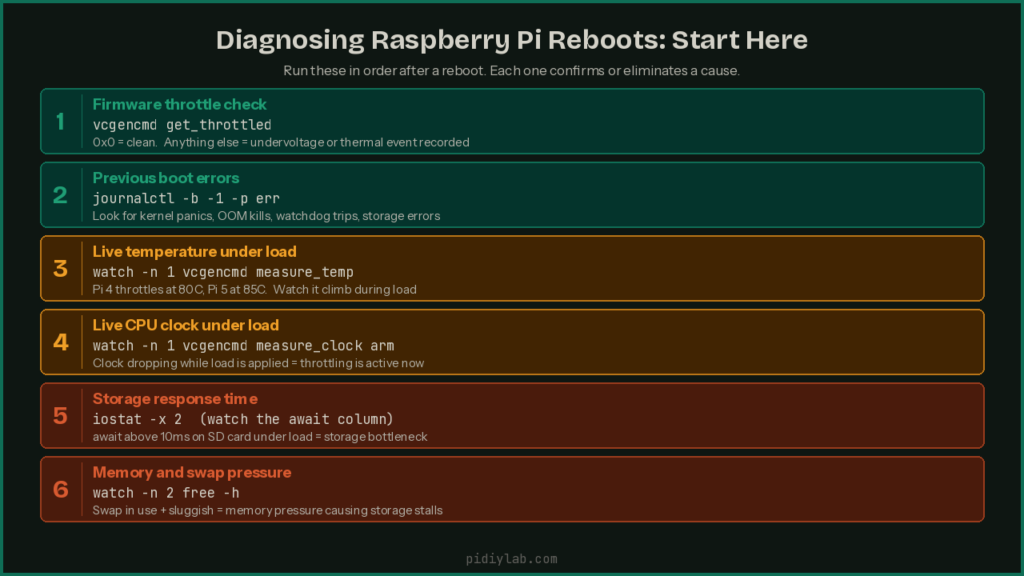
First command to run after any reboot
This is the single most useful thing you can do. The firmware tracks throttling and undervoltage events across the lifetime of the current boot and stores them in a register:
vcgencmd get_throttledThe output is a hex value. Here is what each bit means:
| Bit | Meaning |
|---|---|
| 0 | Currently under-voltage |
| 1 | Currently ARM frequency capped |
| 2 | Currently throttled |
| 3 | Currently soft temperature limit active |
| 16 | Under-voltage has occurred since last reboot |
| 17 | ARM frequency capping has occurred since last reboot |
| 18 | Throttling has occurred since last reboot |
| 19 | Soft temperature limit has occurred since last reboot |
A return value of 0x0 means nothing has been flagged. A value of 0x50000 means under-voltage and throttling have occurred since last boot. Run this immediately after a reboot and before putting the system back under load. The register clears on reboot so timing matters.
Check the previous boot’s logs
If the system rebooted cleanly enough to write anything, this shows you what happened in the boot session before the current one:
# View logs from the previous boot session
journalctl -b -1

# Filter for errors and critical messages only
journalctl -b -1 -p err

# Check for kernel messages including thermal or OOM events
journalctl -b -1 -k
Monitor temperature in real time
# Current CPU temperature
vcgencmd measure_temp

# Watch temperature update every second
watch -n 1 vcgencmd measure_temp

# Check if throttling is active right now
vcgencmd get_throttled
Check current voltage and clock speed
# Current core voltage
vcgencmd measure_volts core

# Current ARM clock speed (drops when throttled)
vcgencmd measure_clock arm

# Watch clock speed drop in real time under load
watch -n 1 vcgencmd measure_clock arm
Isolate load stacking
If the reboot happens during a specific task, try removing variables one at a time. Disconnect nonessential USB devices. Run the same workload without external storage. Stagger backup timing away from peak load. If the reboot threshold moves or disappears when you remove a component, that component is part of the problem even if it is not the whole story.
Failure Modes Worth Knowing About
Brownouts that never trigger warnings
One of the nastiest failure modes is the brownout that never shows up as an undervoltage warning. The voltage dips just far enough, just long enough, to reset the board, but not long enough for firmware or the OS to say anything about it. From your perspective it looks like the system simply decided to reboot out of boredom. No lightning bolt icon. No throttling message. Nothing. This is common when multiple short current spikes overlap during USB storage writes combined with CPU ramps. If you are waiting for a warning before believing power is involved, you may wait forever.
Resets during filesystem sync
Filesystem sync is a perfect storm. The system flushes buffers, storage pulls current, the CPU does real work, and everything happens at once. If a reboot hits during this window, the damage often shows up later rather than immediately. The Pi boots. Everything looks fine. Days later, filesystem errors appear and databases complain. People assume the corruption caused the reboot. In reality the reboot caused the corruption.
Thermal resets below expected limits
Temperature sensors report averages. A local hotspot inside the SoC can trigger a shutdown while reported temperatures still look safe. Ambient heat makes this worse. A system that survives at 70 degrees room temperature might reset at 75 with the same workload. If your Pi only reboots in summer or inside a cabinet, that is not coincidence.
Cascading failures after fixes
Fix one issue and you sometimes surface another. Better cooling lets the CPU stay at higher clocks longer, which increases power draw. A powered USB hub solves storage resets but introduces its own quirks. The system feels haunted because every fix creates a new failure mode. In reality you are peeling layers off a very tight margin.
What Actually Helps
Reduce stacked load, not just individual components
The fastest path to stability is not making one component better. It is reducing how many things spike at the same time. Stagger backups. Avoid running updates during peak usage. Limit how many containers start simultaneously. Spread heavy tasks out instead of letting them collide. This sounds boring because it is. It also works more reliably than hardware fixes.
Treat power as a system
Short cables. Thick cables. Clean connectors. Fewer inline adapters. Fewer shared loads. If you are on a Pi 5, use the official 27W USB-C supply or one that explicitly supports the 5V 5A USB-C PD profile. If external storage is involved, consider a powered hub but test with and without it. Don’t assume adding power always helps.
Cap performance intentionally
Lowering CPU frequency feels like defeat. It isn’t. It’s choosing stability over bragging rights. A Pi that runs slightly slower but never reboots is far more useful than one that benchmarks well and falls over during real work. The same applies to I/O intensity. Reduce write frequency where possible. Batch operations instead of letting them hammer the system constantly.
Get storage off the SD card
If you are writing constantly to an SD card, you are living on borrowed time for both corruption and stability. Moving the root filesystem to a USB SSD removes one of the most common stacked load triggers. Moving swap to zram removes another. Both changes together make a meaningful difference to reboot behavior under load. Both are covered in detail at Booting Raspberry Pi from USB SSD and Setting Up zram on Raspberry Pi.
Know when to stop tuning
If you have cleaned up power, reduced load collisions, managed heat, moved off SD card, and the system still reboots under realistic use, that is your signal. You are not failing. The platform is telling you it is done. At that point, changing platforms is not giving up. It is finishing the job.
FAQ
Why does my Raspberry Pi reboot only during backups?
Backups stack CPU, disk writes, and USB activity at the same time. That overlap creates short power and timing spikes that expose margins you didn’t know were thin. Staggering backup timing away from other heavy tasks often reduces or eliminates these reboots without touching hardware.
Why do stress tests pass but real use fails?
Stress tests isolate one subsystem. Real workloads stack several at the same time. The Pi usually fails during overlap, not at the peak of any single metric. A CPU stress test tells you nothing about what happens when the CPU is busy and storage is active and USB is pulling current simultaneously.
How do I check if my Raspberry Pi has undervoltage?
Run vcgencmd get_throttled immediately after a reboot before putting the system under load again. A non-zero result means the firmware detected undervoltage or throttling since the last boot. The register clears on reboot so you need to check it before the next reboot happens.
How do I check Raspberry Pi temperature?
Run vcgencmd measure_temp for a snapshot or watch -n 1 vcgencmd measure_temp to monitor it updating every second while load is applied. The Pi 4 begins soft throttling at 80 degrees Celsius and hard throttling at 85. The Pi 5 targets 85 degrees with active cooling and may throttle sooner without it.
Why are there no logs after a reboot?
Many resets happen too fast for the OS to write anything. Power loss and hard resets cut logging before the journal can flush to storage. Check journalctl -b -1 for whatever the previous boot managed to capture, and check vcgencmd get_throttled for firmware-level evidence that survives the reboot.
Can a better power supply fix everything?
No. It can improve margin, but cable resistance, transient response, and internal power management still matter. A better supply is worth trying but treat it as one variable in a larger system, not a guaranteed fix.
Is my Raspberry Pi board defective?
Almost certainly not. Most boards behave exactly as designed when pushed beyond their comfortable envelope. These are not server-grade components. They are constrained by cost, size, and power budget by design. The reboot is usually the platform telling you the workload is too much, not that something is broken.
References
- https://www.raspberrypi.com/documentation/computers/raspberry-pi.html#power-supply
- https://www.kernel.org/doc/html/latest/admin-guide/thermal/index.html
- https://www.kernel.org/doc/html/latest/admin-guide/pm/index.html