
Last tested: Raspberry Pi OS Bookworm 64-bit | April 11, 2026 | Raspberry Pi 4 Model B (4GB) with Raspberry Pi HQ Camera
Raspberry Pi HQ Camera motorized focus telephoto build turns the IMX477-based camera module into a capable long-distance imaging tool. The HQ Camera’s C-mount and CS-mount compatibility opens up a wide range of interchangeable lenses, and adding motorized focus control removes the need to physically adjust the lens ring on every shot. This guide covers lens mount selection, focal length choice, hardware assembly, libcamera configuration, and the software tools for controlling motorized focus.
Key Takeaways
- The Raspberry Pi HQ Camera uses the Sony IMX477 12.3MP back-illuminated sensor with C-mount and CS-mount lens compatibility.
- A 5mm C-CS adapter ring converts the camera’s CS-mount to accept C-mount lenses. Both adapter and lens must be present for correct flange distance.
- Motorized focus modules from Arducam work with a software control script and are practical for static and slow-moving subjects.
- On Bookworm, camera detection uses
libcamera-hello --list-cameras. The oldvcgencmd get_cameracommand does not work with the libcamera stack. - Telephoto focal lengths above 25mm amplify camera shake significantly. A tripod or rigid mount is required for sharp results.
- Used C-mount lenses from security or industrial sources work well and cost significantly less than new photography lenses.
Hardware Overview
Raspberry Pi board selection
Any Raspberry Pi with a CSI camera connector works with the HQ Camera. Pi 4 is the practical choice for this build. It handles 12MP image capture and libcamera video encoding without the memory constraints that affect Pi 3 and Zero builds. Pi 5 works equally well and provides faster image processing pipeline throughput, which matters when capturing RAW files or high frame rate video.
The HQ Camera module
| Specification | Value |
|---|---|
| Sensor | Sony IMX477 |
| Resolution | 12.3MP (4056 x 3040) |
| Sensor type | Back-illuminated CMOS |
| Sensor size | 1/2.3 inch |
| Pixel size | 1.55 µm |
| Lens mount | CS-mount (C-mount via 5mm adapter) |
| Interface | CSI-2 ribbon cable |
| Tripod thread | 1/4-20 standard |
Lens Mounts and Lens Selection
C-mount vs CS-mount explained
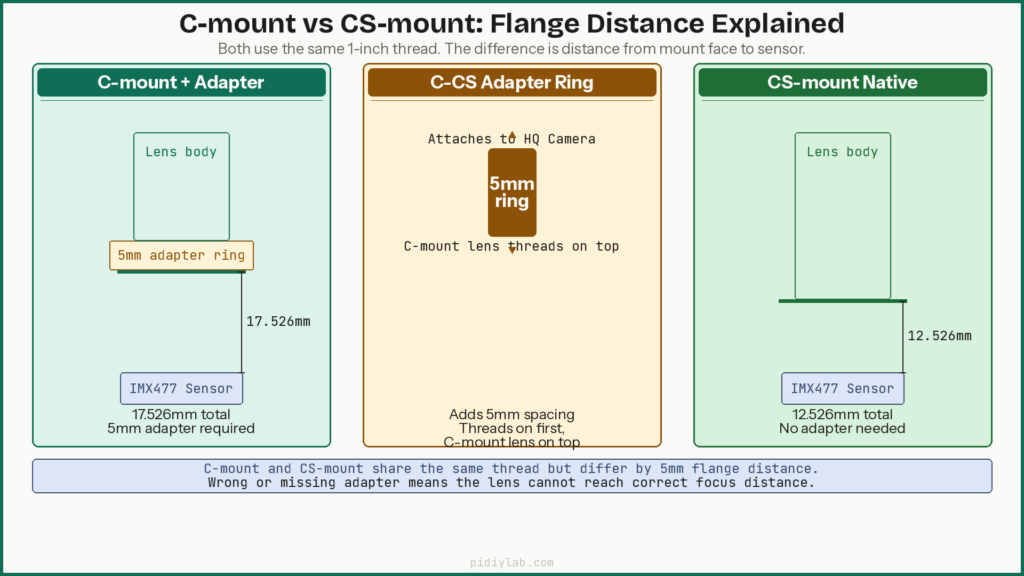
The HQ Camera ships with a CS-mount. The difference between C-mount and CS-mount is the flange focal distance: the distance from the lens mount face to the sensor. C-mount has a 17.526mm flange distance. CS-mount has a 12.526mm flange distance. The 5mm difference is handled by the included C-CS adapter ring, which threads onto the camera before attaching a C-mount lens.
| Mount type | Flange distance | Thread | Adapter for HQ Camera | Common source |
|---|---|---|---|---|
| CS-mount | 12.526mm | 1 inch, 32 TPI | None (native) | Budget CCTV lenses |
| C-mount | 17.526mm | 1 inch, 32 TPI | 5mm C-CS ring | Industrial, security |
| M12 (S-mount) | Varies | M12 x 0.5mm | M12-CS adapter | Wide-angle, fisheye |
Focal length selection
| Focal length | Approx. horizontal FoV | Character | Best for |
|---|---|---|---|
| 3.6mm | ~90° | Wide angle | Security coverage, indoor wide shots |
| 6mm | ~55° | Standard wide | General outdoor scenes |
| 16mm | ~21° | Telephoto | Bird feeders, medium-distance subjects |
| 25mm | ~14° | Telephoto | Garden wildlife, observation |
| 35mm | ~10° | Long telephoto | Distant subjects, stable mount essential |
| 50mm | ~7° | Long telephoto | Very distant subjects, pre-set focus |
For most practical Raspberry Pi telephoto builds, 16mm to 25mm offers the best balance of subject magnification and focus tolerance. Lenses above 35mm have very shallow depth of field on this sensor, which makes manual focus difficult and motorized focus control significantly more useful.
Motorized focus lenses
Arducam produces an IMX477-based camera board with a built-in motorized focus mechanism and a separate I2C motor control board. Focus position is set via software rather than manually turning the lens ring. This approach is practical for fixed installations where physical access is awkward, telephoto setups where small manual adjustments are imprecise, and automated observation setups paired with object detection. For a practical bird feeder camera build using the Pi camera stack with motion detection, see Raspberry Pi Bird Feeder Camera with Motion Detection.
Hardware Assembly
Connecting the ribbon cable
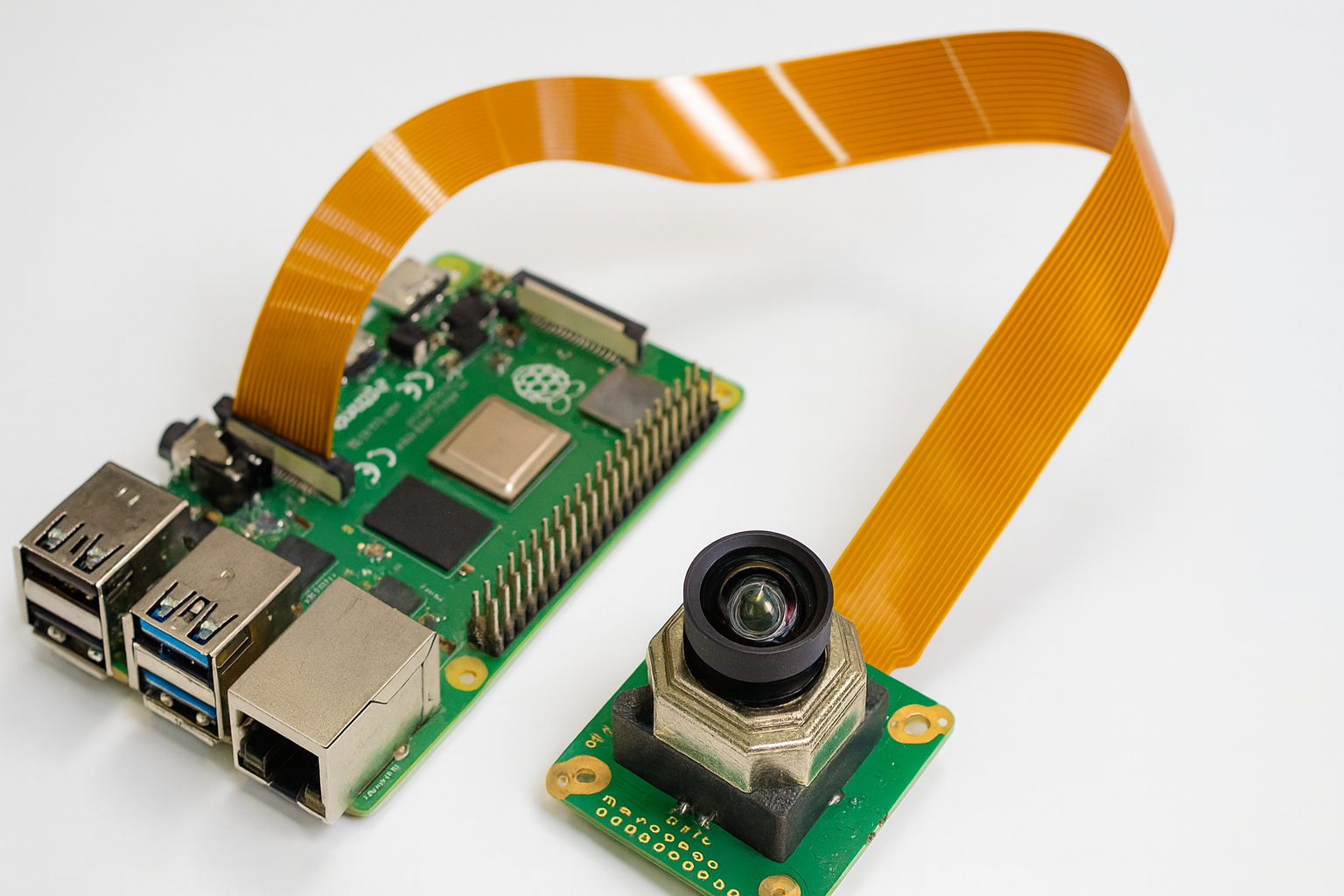
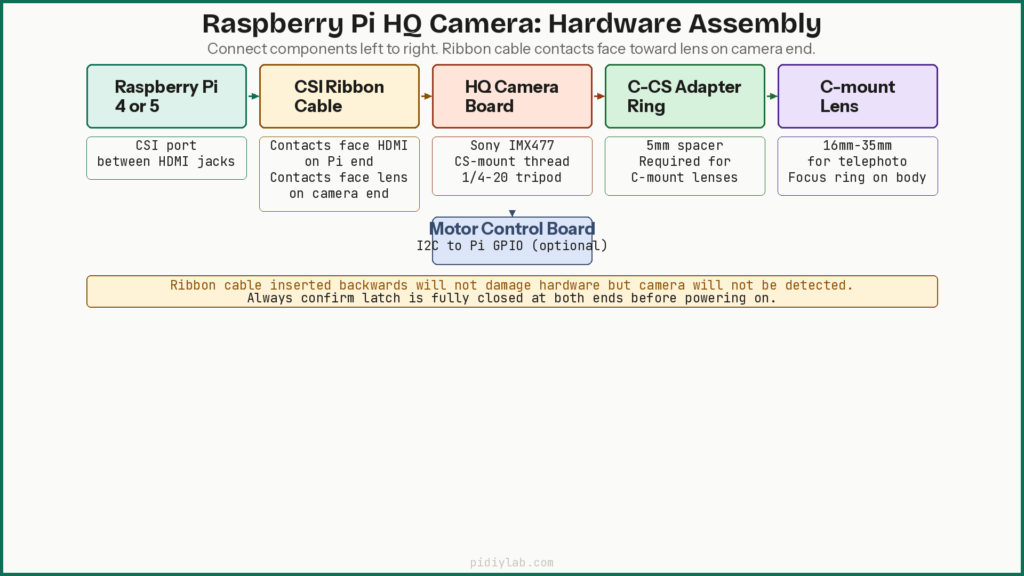
The HQ Camera connects to the Pi via a CSI ribbon cable. On the Pi, the shiny contacts face toward the HDMI ports. On the HQ Camera board, the contacts face toward the lens mount side. Lift the connector latch, insert the cable fully, and press the latch closed. A loose cable causes intermittent detection failures that look like driver or software problems.
Attaching the lens
For a C-mount lens, thread the 5mm C-CS adapter ring onto the camera’s lens mount first, then thread the C-mount lens onto the adapter. For a CS-mount lens, thread it directly onto the camera. Tighten firmly but do not force. The 1-inch 32 TPI thread will cross-thread if started at an angle.
Backfocus adjustment
Some lenses cannot reach infinity focus without adjusting the backfocus ring, which sits between the lens body and the camera mount. Loosen the small set screws on the ring, rotate it slightly, retighten, and test focus using the live preview. This is a one-time adjustment per lens. Once set correctly, tighten the screws securely or backfocus will drift during use.
Mounting and stability
The HQ Camera board has a 1/4-20 tripod thread. Telephoto focal lengths of 25mm and above amplify vibration significantly. A movement invisible to the eye produces visible blur at the sensor. A standard tripod handles most builds. For permanent installations, a mounting bracket bolted to a fixed surface is more reliable than adhesive or improvised mounts.
Power requirements
The HQ Camera draws power from the Pi’s CSI interface and does not need a separate supply. A motorized focus module adds current draw via GPIO. Use the official 5V/3A supply for Pi 4 or 5V/5A for Pi 5. Cheap supplies that sag under load cause USB instability and camera disconnects that are difficult to diagnose.
Software Setup on Bookworm
Verify camera detection
On Bookworm, the camera is enabled by default and uses the libcamera stack. The old vcgencmd get_camera command does not work with libcamera. Use:
libcamera-hello --list-camerasA detected HQ Camera shows as IMX477 with resolution and mode information. If nothing is listed, reseat the ribbon cable. Also check:
dmesg | grep -i "imx477\|camera\|csi"Live preview for focus adjustment
# Full-screen preview
libcamera-hello --timeout 0

# Digital zoom on centre of frame for checking focus sharpness
libcamera-hello --timeout 0 --roi 0.25,0.25,0.5,0.5
Capturing still images
# Basic JPEG capture
libcamera-still -o image.jpg

# RAW DNG alongside JPEG
libcamera-still -o image.jpg --raw

# Manual exposure
libcamera-still -o image.jpg --shutter 10000 --gain 1.0 --awb daylight
Video recording
# 1080p 30fps
libcamera-vid -o video.h264 --width 1920 --height 1080 --framerate 30 --timeout 10000

# 4K (Pi 5 recommended for sustained encoding)
libcamera-vid -o video.h264 --width 4056 --height 3040 --framerate 10 --timeout 10000
libcamera key flags reference
| Flag | Use | Example |
|---|---|---|
--timeout | Duration in ms (0 = indefinite) | --timeout 5000 |
--width / --height | Output resolution | --width 1920 --height 1080 |
--shutter | Shutter speed in microseconds | --shutter 10000 (1/100s) |
--gain | Analogue gain (replaces ISO) | --gain 2.0 |
--awb | White balance mode | --awb daylight |
--roi | Region of interest crop | --roi 0.25,0.25,0.5,0.5 |
--raw | Save DNG RAW alongside JPEG | --raw |
--framerate | Video frame rate | --framerate 30 |
Motorized focus control
# Install Arducam focus control library
pip3 install arducam-config-parser --break-system-packages

# Set focus position via Python (0 = near, 1000 = far)
python3 -c "
import Arducam_focus_mot as focus
cam = focus.ArducamCamera()
cam.init()
cam.set_focus(500)
cam.close()
"
Arducam’s autofocus script sweeps focus positions and selects the sharpest result by contrast analysis. It works reliably for static scenes with adequate contrast. For low-contrast scenes or fast-moving subjects, setting focus manually to the expected subject distance gives more consistent results.
Practical Build Configurations
Wildlife and bird photography
A 16mm or 25mm C-mount lens mounted near a bird feeder captures detailed images at 1 to 3 metres. Set focus once to the feeder distance using the live preview, then trigger captures via Python or a GPIO button. For motion-triggered capture using the same hardware, see Raspberry Pi Bird Feeder Camera with Motion Detection.
Long-distance time-lapse
# Cron entry: capture every 5 minutes
*/5 * * * * libcamera-still -o /home/pi/timelapse/$(date +\%Y\%m\%d_\%H\%M\%S).jpg

# Assemble into video with ffmpeg
ffmpeg -framerate 24 -pattern_type glob -i '/home/pi/timelapse/*.jpg' \
  -c:v libx264 -pix_fmt yuv420p timelapse.mp4
Security and observation
A 25mm to 35mm lens covers a narrow field of view suitable for monitoring a specific area at distance. Pair with the motion package or a Picamera2 detection script for motion-triggered recording. For continuous recording to disk, moving storage to USB SSD reduces write wear and improves throughput. See Booting Raspberry Pi from USB SSD.
Troubleshooting
Camera not detected
libcamera-hello --list-cameras
dmesg | grep -i "imx477\|camera\|csi"
If --list-cameras returns nothing, reseat both ribbon cable ends. Contacts on the camera end face toward the lens mount. On Pi 4 they face toward the HDMI ports. A cable inserted backwards does not damage the hardware but produces no detection.
Out-of-focus images that manual adjustment cannot fix
If turning the focus ring all the way in either direction does not produce a sharp image, the backfocus ring needs adjustment. Loosen the set screws, rotate the ring a few degrees, retighten, and retest with the live preview. Repeat until infinity focus is achievable. This is a one-time adjustment per lens.
Lens does not physically fit or focus
Confirm the mount type. C-mount and CS-mount use the same thread size and appear similar. A CS-mount lens used without the 5mm adapter ring will not focus correctly. A C-mount lens without the adapter ring will also focus incorrectly. Check both the lens mount type and adapter ring presence before adjusting backfocus.
Unexpected colours or overexposure
libcamera-still -o image.jpg --awb tungsten --gain 1.0 --shutter 20000White balance modes: auto, daylight, cloudy, tungsten, fluorescent, indoor. Overexposure is usually a shutter speed issue. Reduce the shutter value for a shorter exposure or lower the gain value.
Image lag or dropped frames
Lower resolution or frame rate first and confirm the problem resolves before adjusting other settings. Writing high-bitrate video to SD card causes buffer overflows that appear as frame drops. USB SSD resolves most write-speed issues. See Preventing SD Card Corruption on Raspberry Pi for SD card builds.
FAQ
Do I need a specific Raspberry Pi model for the HQ Camera?
Any Pi with a CSI connector works. Pi 4 is the practical minimum for comfortable high-resolution stills and 1080p video. Pi 5 is the best option for fast RAW processing or 4K video encoding.
Can I use DSLR lenses with the HQ Camera?
Yes, with a C-mount adapter for the DSLR lens mount in question. The 1/2.3 inch IMX477 sensor is much smaller than a DSLR sensor, so a significant crop factor applies. A 50mm DSLR lens becomes a very long telephoto on this sensor. Manual aperture and focus are typically available. Electronic aperture control and autofocus from the DSLR lens body are not.
Is motorized autofocus reliable for fast-moving subjects?
Not reliably. Arducam’s autofocus sweeps through positions by contrast detection and takes a fraction of a second. For static or slow-moving subjects it works well. For fast-moving subjects, setting focus manually to the expected subject distance and leaving it fixed gives better results.
What is the maximum capture resolution?
The IMX477 sensor’s maximum resolution is 4056 x 3040 pixels (12.3MP) for still capture. Video modes use sub-sampled or cropped regions. Run libcamera-hello --list-cameras to see available capture modes and their frame rate limits on your specific setup.
Can I stream live video from the HQ Camera?
Yes. libcamera-vid can output to stdout and be piped to VLC or ffmpeg for network streaming. The motion package and Picamera2 both support MJPEG streaming over HTTP. For a full RTSP streaming setup, see the RTSP surveillance guide on PidiyLab.
References
- https://datasheets.raspberrypi.com/hq-camera/hq-camera-product-brief.pdf
- https://www.arducam.com/arducam-12mp-imx477-motorized-focus-high-quality-camera-for-raspberry-pi.html
- https://blog.arducam.com/raspberry-pi-high-quality-camera-c-cs-mount-lens/
- https://libcamera.org/docs.html
About the Author
Chuck Wilson has been programming and building with computers since the Tandy 1000 era. His professional background includes CAD drafting, manufacturing line programming, and custom computer design. He runs PidiyLab in retirement, documenting Raspberry Pi and homelab projects that he actually deploys and maintains on real hardware. Every article on this site reflects hands-on testing on specific hardware and OS versions, not theoretical walkthroughs.
Last tested hardware: Raspberry Pi 4 Model B (4GB) with Raspberry Pi HQ Camera. Last tested OS: Raspberry Pi OS Bookworm 64-bit.