
Last tested: Raspberry Pi OS Bookworm 64-bit | April 11, 2026 | Raspberry Pi 4 (4GB) and Raspberry Pi 5 (8GB)
Text to speech Raspberry Pi Piper setup gives the board a fully offline voice without cloud dependencies, subscriptions, or network round-trips. Piper is the most capable offline TTS engine for Raspberry Pi right now. It uses VITS-trained ONNX voice models, runs well on Pi 4 and Pi 5, and produces speech that is noticeably more natural than older tools like eSpeak NG or Festival. This guide covers installing Piper, comparing the available offline TTS engines, integrating TTS with Python, and troubleshooting the most common audio problems.
Key Takeaways
- Piper is the recommended offline TTS engine for Raspberry Pi. It runs on Pi 4 and Pi 5 with medium voice models and produces natural-sounding output.
- eSpeak NG and Festival are fast and lightweight but produce robotic-sounding voice output. They suit alerts and accessibility tools more than conversational applications.
- Coqui TTS was sunset in 2024. Community forks exist but are less actively maintained. Use Piper or Mimic 3 for new projects.
- XTTS-v2 and Bark produce the most natural-sounding output but are too slow for real-time use on Pi hardware. Pre-generate audio files and play them back.
- On Bookworm,
RPi.GPIOis deprecated. Usegpiozeroorlgpiofor GPIO-triggered TTS projects. - All engines covered here run fully offline. No data leaves the Pi after initial model download.
Choosing the Right Raspberry Pi Model
Raspberry Pi 4
Pi 4 with 2GB or more of RAM handles Piper TTS with medium voice models without difficulty. eSpeak NG, Festival, and Mimic 3 all run comfortably. Large ONNX voice models labeled “high quality” will generate speech successfully but with a noticeable delay of several seconds. For most practical applications (voice alerts, home automation announcements, kiosk speech), Pi 4 is sufficient.
Raspberry Pi 5
Pi 5 gives meaningful headroom for larger models and simultaneous workloads. Running Piper alongside Whisper.cpp for a local speech-to-text pipeline, or attempting XTTS-v2 for higher quality output, is more practical on Pi 5. The faster memory and CPU also reduce the latency of medium-quality Piper models to near-real-time.
Storage and audio hardware
Use a 32GB or larger SD card or USB SSD to hold voice model files comfortably. Piper medium models are 60 to 150MB each. High-quality models can exceed 500MB. The Pi’s 3.5mm audio jack has adequate but not exceptional quality. A USB audio adapter improves output noticeably on Pi 4, which has a shared audio and power rail. For SD card longevity on a system writing audio files continuously, see Setting Up zram on Raspberry Pi and Preventing SD Card Corruption on Raspberry Pi.
Installing Text to Speech on Raspberry Pi with Piper
What Piper is
Piper started as part of the Rhasspy voice assistant project and is now widely used standalone. It runs VITS-trained neural voice models in ONNX format. The model files are available in low, medium, and high quality tiers. Medium models balance file size, generation speed, and voice naturalness well. High-quality models sound better but generate more slowly on Pi hardware.
Install Piper via binary
Download the latest ARM64 release from the Piper GitHub releases page:
# Create a directory for Piper
mkdir -p ~/piper && cd ~/piper

# Download latest ARM64 release (check github.com/rhasspy/piper for current version)
wget https://github.com/rhasspy/piper/releases/download/v1.2.0/piper_linux_aarch64.tar.gz
tar -xzf piper_linux_aarch64.tar.gz
Download a voice model
Each voice is two files: the ONNX model and a JSON config file. Download both from the Piper voices repository. This example uses the US English Lessac medium voice:
mkdir -p ~/piper/voices && cd ~/piper/voices

# ONNX model
wget https://huggingface.co/rhasspy/piper-voices/resolve/main/en/en_US/lessac/medium/en_US-lessac-medium.onnx

# Config file (required alongside the model)
wget https://huggingface.co/rhasspy/piper-voices/resolve/main/en/en_US/lessac/medium/en_US-lessac-medium.onnx.json
Test Piper
cd ~/piper

echo "Hello from your Raspberry Pi" | ./piper
  --model voices/en_US-lessac-medium.onnx
  --output_file hello.wav

aplay hello.wav
A successful run generates a WAV file and plays it back. Generation time for a short sentence on Pi 4 is typically 1 to 3 seconds with a medium model. On Pi 5 it is under 1 second. If aplay produces no sound, see the audio troubleshooting section below.
Available voice models
Piper has voices for dozens of languages. A selection of well-tested English options:
en_US-lessac-medium: US English, natural male voice, good balance of size and qualityen_US-libritts_r-medium: US English, broader tonal rangeen_GB-alba-medium: British English female voiceen_US-lessac-low: smaller file, faster generation, lower quality
Browse the full list at the Piper voices HuggingFace repository. Every language folder contains low, medium, and in some cases high quality variants.
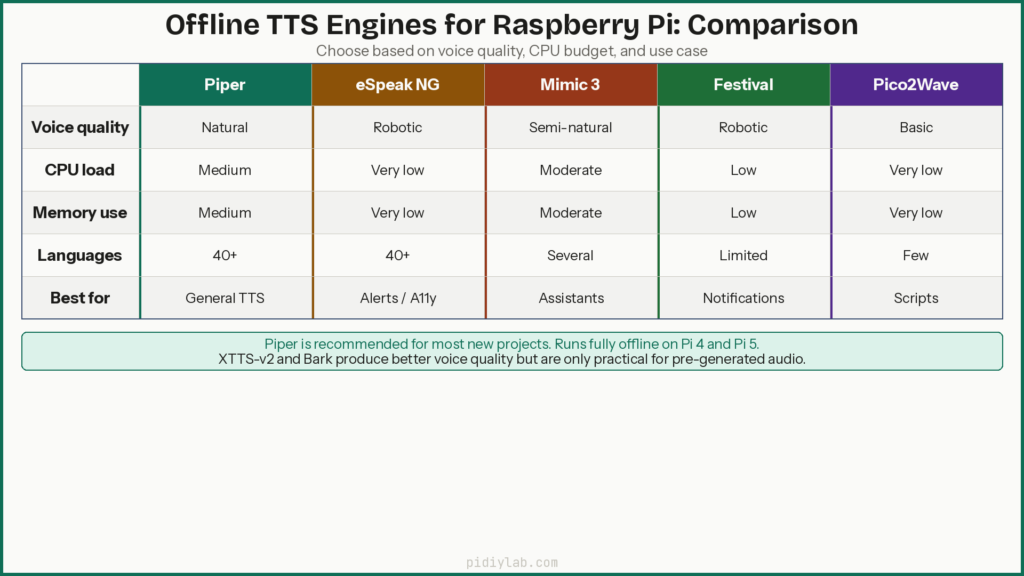
Comparing Offline TTS Engines for Raspberry Pi
| Engine | Voice quality | CPU load | Memory use | Languages | Best for |
|---|---|---|---|---|---|
| Piper | Natural | Medium | Medium | 40+ | General offline TTS |
| eSpeak NG | Robotic | Very low | Very low | 40+ | Alerts, accessibility |
| Mimic 3 | Semi-natural | Moderate | Moderate | Several | Offline assistants |
| Festival | Robotic | Low | Low | Limited | Simple notifications |
| Pico2Wave | Basic | Very low | Very low | Few | Short automation scripts |
| XTTS-v2 | Very natural | Very high | High | Many | Pre-generated audio files |
| Bark | Expressive | Very high | Very high | Several | Narration, artistic projects |
eSpeak NG
sudo apt install espeak-ng -y
espeak-ng "Testing eSpeak on Raspberry Pi"
eSpeak NG generates speech in milliseconds with minimal memory use. The output is recognisably synthetic but perfectly intelligible. It supports over 40 languages out of the box and handles unusual character sets well. For alerts, screen reader output, and accessibility tools where latency matters more than voice quality, eSpeak NG is the right choice.
Mimic 3
Mimic 3 is a neural TTS engine from the Mycroft project designed for offline privacy-first setups. It produces noticeably more natural speech than eSpeak NG at moderate CPU cost. It integrates well with Home Assistant and Rhasspy. Install via pip and download voices from the Mimic 3 voice repository.
Festival
sudo apt install festival -y
echo "Testing Festival" | festival --tts
Festival is one of the oldest maintained TTS systems on Linux. The voice quality is robotic but consistent and the resource footprint is tiny. It is a reasonable choice for system notifications and educational projects where voice quality is not the primary concern.
Pico2Wave
sudo apt install libttspico-utils -y
pico2wave -w output.wav "Testing Pico2Wave" && aplay output.wav
Pico2Wave is very lightweight and generates speech faster than Piper while sounding better than eSpeak NG. It supports English, German, French, Spanish, and Italian. For simple automation scripts reading short strings, it is a good middle ground between speed and voice quality.
A note on Coqui TTS
Coqui TTS was a well-regarded neural TTS engine with a Python API. The company closed in 2024 and the original project is no longer actively maintained. Community forks exist and pip install TTS may still install a working version, but for new projects Piper and Mimic 3 are better-supported alternatives with active development. If an existing project depends on Coqui, pin the last known-good version and do not rely on it for new deployments.
XTTS-v2 and Bark
Both produce the most natural-sounding output available for offline TTS but are not practical for real-time use on Pi hardware. XTTS-v2 can clone a voice from a short audio sample and supports multilingual output. Bark adds non-verbal sounds, breathing, and expressive pacing. On Pi 5, a short sentence takes 30 to 60 seconds to generate with either engine. The practical approach is to generate audio files on a desktop or server and play them back on the Pi, rather than attempting real-time synthesis.
Best Use Cases by Engine
Home automation announcements
Piper and Mimic 3 are the right choices for Home Assistant or Rhasspy voice output. Both run offline, integrate with these platforms directly, and produce voice quality that is appropriate for status messages and alerts. See Home Automation with Raspberry Pi for the broader integration picture.
Accessibility and screen reading
eSpeak NG is the best option here. It generates speech with minimal latency, handles a wide range of languages and character sets reliably, and has low enough overhead to run alongside other applications without affecting system responsiveness.
Offline voice assistants
Piper paired with Whisper.cpp creates a fully local speech pipeline: Whisper handles the speech-to-text leg, Piper handles the response. Both run offline. This combination suits privacy-focused assistant builds where no data should leave the device. See Build a Voice Assistant on Raspberry Pi for the full setup.
Kiosks and public information displays
Festival and Pico2Wave work well here. Speed and reliability matter more than voice naturalness in kiosk contexts, and both engines start quickly without model loading delays. For kiosks that need to run continuously, booting from USB SSD rather than SD card removes the write-wear failure mode from the equation. See Booting Raspberry Pi from USB SSD.
Running TTS from Python
Piper with Python via subprocess
Piper does not have an official Python package but is straightforward to call from subprocess:
import subprocess

text = "This is your Raspberry Pi speaking"
model = "/home/pi/piper/voices/en_US-lessac-medium.onnx"

result = subprocess.run(
    ["/home/pi/piper/piper", "--model", model, "--output_file", "/tmp/speech.wav"],
    input=text.encode(),
    capture_output=True
)
subprocess.run(["aplay", "/tmp/speech.wav"])
eSpeak NG from Python
import subprocess

def speak(text, speed=150, pitch=50):
    subprocess.run(["espeak-ng", "-s", str(speed), "-p", str(pitch), text])

speak("Sensor reading complete")
RealTimeTTS
RealTimeTTS is a Python library designed for low-latency streaming TTS output. It supports multiple backends including Piper and eSpeak NG and is well-suited for interactive applications where the response needs to start speaking before the full text is generated:
pip install realtimetts --break-system-packagesGPIO-triggered speech on Bookworm
On Raspberry Pi OS Bookworm, RPi.GPIO is deprecated. Use gpiozero which is pre-installed on Bookworm:
from gpiozero import Button
import subprocess

button = Button(17, pull_up=True)

def on_press():
    subprocess.run(["espeak-ng", "Button pressed"])

button.when_pressed = on_press

# Keep the script running
import signal
signal.pause()
Automating playback
For scheduled announcements, a cron job calling a Python script with Piper is reliable and lightweight. For sensor-triggered speech, the gpiozero pattern above works well. For a web-triggered voice endpoint, wrapping a Piper subprocess call in a Flask or FastAPI route gives a simple local API that any device on the LAN can call.
Troubleshooting Audio on Raspberry Pi
No audio output
# List available audio devices
aplay -l

# Test a specific device
aplay -D hw:0,0 hello.wav

# Check and adjust volume
alsamixer
The Pi defaults to HDMI audio when a display is connected. If you want audio through the 3.5mm jack or a USB adapter, set the default device in ~/.asoundrc:
pcm.!default {
    type hw
    card 1
}
ctl.!default {
    type hw
    card 1
}
Replace card 1 with the card number shown for your device in aplay -l.
Poor sound quality or distortion
The Pi 4’s onboard audio shares a power rail with the USB bus and picks up interference. A USB audio adapter costing a few dollars resolves this completely. If staying with onboard audio, convert generated WAV files to 16-bit 44100Hz before playback:
sudo apt install sox -y
sox input.wav -r 44100 -b 16 output.wav
Slow speech generation or lag
Switch to a lower-quality Piper model first. The low tier models generate 3 to 5 times faster than high quality at the cost of some naturalness. Pre-generate WAV files for fixed phrases rather than generating on demand. Running the Pi headless (without a desktop GUI) frees 100 to 200MB of RAM and several percentage points of CPU that the desktop compositor was consuming.
System crashes during TTS generation
Check temperature with vcgencmd measure_temp and throttle status with vcgencmd get_throttled. Large model inference combined with audio playback can push the Pi 4 to its thermal limit without active cooling. Check available RAM with free -h. If swap is heavily used, either reduce the model size or increase swap. The Pi 5 handles simultaneous TTS and other workloads more comfortably with active cooling in place.
FAQ
Does Piper need an internet connection?
No. Once the binary and voice model are downloaded, Piper runs entirely offline. Nothing is sent to any server during synthesis. This makes it suitable for air-gapped installations, privacy-sensitive projects, and setups where network access is unreliable.
What is the most natural-sounding offline TTS engine for Raspberry Pi?
Piper produces the best practical output for real-time use on Pi hardware. XTTS-v2 and Bark sound more human but are too slow for real-time synthesis on a Pi. If generation time is not a constraint and audio can be pre-generated, XTTS-v2 is worth considering for projects where voice quality matters most.
Can I use voice cloning on a Raspberry Pi?
XTTS-v2 supports voice cloning from a short audio sample, but the generation process is too slow for real-time use on Pi hardware. The practical approach is to generate the cloned voice audio on a desktop machine and play back the resulting files on the Pi. Real-time voice cloning on Pi hardware is not currently viable.
How do I switch voices in Piper?
Each voice is a separate ONNX model file. Download a different model from the Piper voices HuggingFace repository and point the --model flag to it. Multiple models can coexist in the same directory and be selected at runtime. This makes it straightforward to switch language or voice tone per application context.
Which TTS engine uses the least memory?
eSpeak NG. It runs in a few megabytes of RAM and generates speech almost instantaneously. Festival and Pico2Wave are similarly lightweight. If your project runs on minimal hardware or has tight memory constraints, eSpeak NG is the safe choice despite its robotic output.
References
- https://github.com/rhasspy/piper
- https://huggingface.co/rhasspy/piper-voices
- https://github.com/MycroftAI/mimic3
- https://github.com/KoljaB/RealtimeTTS
- https://espeak.sourceforge.net/
About the Author
Chuck Wilson has been programming and building with computers since the Tandy 1000 era. His professional background includes CAD drafting, manufacturing line programming, and custom computer design. He runs PidiyLab in retirement, documenting Raspberry Pi and homelab projects that he actually deploys and maintains on real hardware. Every article on this site reflects hands-on testing on specific hardware and OS versions, not theoretical walkthroughs.
Last tested hardware: Raspberry Pi 4 (4GB) and Raspberry Pi 5 (8GB). Last tested OS: Raspberry Pi OS Bookworm 64-bit.