


Raspberry Pi power monitoring via USB gives you measured voltage, current, and power draw rather than guesses about whether your supply is adequate. Most Pi stability problems (random reboots, SD card corruption, USB devices disconnecting mid-transfer) trace back to power issues that a $10 inline meter or a wired INA219 sensor would have caught immediately. This guide covers what to measure, which tools to use, how to log readings over time, and how to use the data to fix problems before they damage hardware or corrupt files.
Last tested: Raspberry Pi OS Bookworm Lite 64-bit | March 8, 2026 | Raspberry Pi 4 Model B (4GB) | INA219 breakout via I2C | Grafana + InfluxDB v2
Raspberry Pi Power Monitoring via USB: What You Are Measuring
Three values matter for USB power monitoring:
- Voltage (V): Should stay at or above 4.75V at the Pi’s USB input. The Pi 4 expects 5.1V from its supply. Readings below 4.75V trigger the undervoltage flag and cause CPU throttling, random reboots, and eventual filesystem corruption.
- Current (A): Reflects actual load. A Pi 4 at idle draws around 0.6A. Under CPU stress with USB peripherals attached it can reach 2.5–3A. A supply rated for 3A that sags under 2A load is the most common single cause of Pi instability.
- Power (W): Voltage multiplied by current. Useful for battery and solar budgeting, and for comparing the power cost of different configurations.
The Pi reports its own undervoltage status through the kernel, which you can read at any time:
vcgencmd get_throttled
# 0x0 = no issues
# 0x50000 = undervoltage has occurred since last boot
# 0x50005 = currently undervoltage
This tells you whether undervoltage has occurred but not when, how severe it was, or what caused it. For that you need either an inline meter or a wired sensor.
Inline USB Meters
An inline USB meter plugs between your power supply and the Pi. It measures voltage and current in real time and displays the result on a small screen. No soldering, no configuration, no software. Plug it in and read the numbers.
Inline meters are the right tool for setup validation and quick diagnostics. Plug one in during initial setup to confirm your supply delivers the rated voltage under load. Use one when adding USB peripherals to see how much current each one draws. Use one when troubleshooting instability to rule out power as the cause before spending time on software.
| Model | Interface | Max current | Notes |
|---|---|---|---|
| JacobsParts USB Meter | USB-A | 3.0A | Compact, reliable, low cost |
| Plugable USB-C Meter | USB-C | 6.5A | OLED display, Pi 4 and Pi 5 compatible |
| FNIRSI FNAC-28 | USB-A | 3.0A | Color LCD, multiple display modes |
| Adafruit USB Meter | USB-A | 3.0A | No logging, very reliable |
One practical caveat: some budget meters insert measurable resistance into the line, causing a small voltage drop. This is usually under 50mV and inconsequential for diagnostics, but worth knowing if you are trying to establish a precise voltage baseline.
Inline meters do not log data. If the problem happens at 3am or takes five minutes of USB SSD activity to appear, you will not catch it with an inline meter alone. That is where sensor modules become necessary.
Embedded Sensor Modules
Sensor modules like the INA219 and INA260 connect to the Pi via I2C and report voltage and current directly to software. The Pi reads the values, timestamps them, and stores them continuously, unattended, for as long as the system runs. This is the foundation of any serious power monitoring setup.
| Sensor | Interface | Voltage range | Current range | Notes |
|---|---|---|---|---|
| INA219 | I2C | 0–26V | ±3.2A | Best starting point. Inexpensive, well-supported Python library, accurate for 5V/USB work. |
| INA260 | I2C | 0–36V | ±15A | Built-in shunt resistor, better accuracy, no external calibration needed. |
| ACS712 | Analog | 5V | ±5–30A | Hall effect sensor. Requires ADC on Pi. Less accurate than INA series. |
| INA228 | I2C | 0–85V | ±20A | High-precision. Suited for more demanding logging setups. |
Wire the INA219 to the Pi’s I2C pins: SDA to GPIO 2 (pin 3), SCL to GPIO 3 (pin 5), VCC to 3.3V, GND to GND. Keep I2C wires under 10cm to avoid noise. Enable I2C on Bookworm:
sudo raspi-config
# Interface Options > I2C > Enable

# Confirm the sensor is detected (address 0x40 by default)
sudo i2cdetect -y 1
Expected result: i2cdetect shows 40 in the address grid. If nothing appears, check wiring and confirm I2C is enabled.
Reading Data with Python
Install the INA219 library and its dependencies:
sudo apt install python3-pip -y
pip install pi-ina219 --break-system-packages
A minimal script to read voltage, current, and power:
from ina219 import INA219, DeviceRangeError
from datetime import datetime

SHUNT_OHMS = 0.1
ina = INA219(SHUNT_OHMS)
ina.configure()

try:
    voltage = ina.voltage()
    current = ina.current()
    power   = ina.power()
    ts      = datetime.now().strftime('%Y-%m-%d %H:%M:%S')
    print(f"{ts}  {voltage:.2f}V  {current:.1f}mA  {power:.2f}mW")
except DeviceRangeError:
    print("Current out of range")
To log continuously to a CSV file:
import csv, time
from ina219 import INA219, DeviceRangeError
from datetime import datetime

SHUNT_OHMS = 0.1
LOG_FILE   = '/var/log/power.csv'
INTERVAL   = 5  # seconds

ina = INA219(SHUNT_OHMS)
ina.configure()

with open(LOG_FILE, 'a', newline='') as f:
    writer = csv.writer(f)
    writer.writerow(['timestamp', 'voltage_V', 'current_mA', 'power_mW'])
    while True:
        try:
            row = [
                datetime.now().strftime('%Y-%m-%d %H:%M:%S'),
                round(ina.voltage(), 3),
                round(ina.current(), 1),
                round(ina.power(), 2),
            ]
            writer.writerow(row)
            f.flush()
        except DeviceRangeError:
            pass
        time.sleep(INTERVAL)
Run this as a systemd service so it starts at boot and restarts on failure. Create /etc/systemd/system/power-logger.service:
[Unit]
Description=INA219 power logger
After=network.target

[Service]
ExecStart=/usr/bin/python3 /usr/local/bin/power-logger.py
Restart=on-failure
User=pi

[Install]
WantedBy=multi-user.target
sudo systemctl daemon-reload
sudo systemctl enable --now power-logger.serviceLogging and Visualisation
CSV files are adequate for occasional review but become unwieldy for anything over a few days. InfluxDB and Grafana together give you a proper time-series logging and visualisation stack that runs comfortably on Pi 4 with 4GB RAM.

Install InfluxDB v2 for the Pi:
# Add InfluxDB repository
wget -q https://repos.influxdata.com/influxdata-archive_compat.key
echo '393e8779c89ac8d958f81f942f9ad7fb82a25e133faddaf92e15b16e6ac9ce4c \
  influxdata-archive_compat.key' | sha256sum -c &&
  cat influxdata-archive_compat.key \
  | gpg --dearmor \
  | sudo tee /etc/apt/trusted.gpg.d/influxdata-archive_compat.gpg > /dev/null
echo 'deb [signed-by=/etc/apt/trusted.gpg.d/influxdata-archive_compat.gpg] \
  https://repos.influxdata.com/debian stable main' \
  | sudo tee /etc/apt/sources.list.d/influxdata.list

sudo apt update && sudo apt install influxdb2 -y
sudo systemctl enable --now influxdb
Update the Python logger to write to InfluxDB instead of a CSV using the influxdb-client library:
pip install influxdb-client --break-system-packagesfrom influxdb_client import InfluxDBClient, Point
from influxdb_client.client.write_api import SYNCHRONOUS
from ina219 import INA219, DeviceRangeError
import time
SHUNT_OHMS = 0.1
BUCKET = "powerlog"
ORG = "pidiylab"
TOKEN = "your-influxdb-token"
URL = "http://localhost:8086"
ina = INA219(SHUNT_OHMS)
ina.configure()
client = InfluxDBClient(url=URL, token=TOKEN, org=ORG)
write = client.write_api(write_options=SYNCHRONOUS)
while True:
try:
p = (
Point("power")
.tag("device", "pi4")
.field("voltage_V", round(ina.voltage(), 3))
.field("current_mA", round(ina.current(), 1))
.field("power_mW", round(ina.power(), 2))
)
write.write(bucket=BUCKET, org=ORG, record=p)
except DeviceRangeError:
pass
time.sleep(5)Install Grafana and connect it to InfluxDB as a data source. Add panels for voltage over time, current peaks, and 24-hour power consumption. Set alert thresholds for voltage below 4.75V or current above 2.8A to push a notification before the problem becomes a failure.
For log retention, keep 7 days of 5-second readings and 90 days of hourly aggregates in InfluxDB’s retention policies. This prevents the database from growing to fill the SD card over months of continuous logging.
Optimising Power Draw
Once you have baseline readings, you can measure the actual effect of each optimisation rather than assuming it worked. Common reductions and their typical effect on a Pi 4 running headless:
| Optimisation | Method | Typical saving |
|---|---|---|
| Disable HDMI output | dtoverlay=disable-bt is unrelated. On headless Bookworm, HDMI is already unused. No action needed. | 0 to 25mA on older Pi OS builds |
| Disable onboard Bluetooth | Add dtoverlay=disable-bt to /boot/firmware/config.txt | ~15mA |
| Disable onboard Wi-Fi | Add dtoverlay=disable-wifi to /boot/firmware/config.txt | ~30mA on idle |
| Disable activity LED | Add dtparam=act_led_trigger=none and dtparam=act_led_activelow=on | ~5mA |
| Remove unused USB peripherals | Unplug any device not in active use | 50–500mA per device |
| Use quality cables | Replace thin USB cables with 24AWG or better | 0.05–0.1V voltage recovery |
Verify each change with your meter or logger. A cable swap that recovers 0.08V under load is a real improvement: it pushes headroom further from the 4.75V threshold. Changes that show no measurable effect on your specific setup can be skipped without guilt.
For battery or solar deployments, log average current draw over a full 24-hour cycle including whatever workload the Pi runs overnight. Multiply average current by 24 to get daily Ah consumption. Size the battery to cover at least 2 days of that consumption to handle consecutive overcast days or light nights.
Diagnosing Power Problems
Power problems produce recognisable patterns in logs. Knowing what each pattern means makes diagnosis fast:
| Symptom | What the logs show | Likely cause |
|---|---|---|
| Random reboots | Voltage spike below 4.75V just before timestamp gap | Supply cannot handle load spike; cable resistance too high |
| USB device disconnects | Current spike followed by device traffic stopping | Peripheral draws more than the port or supply can deliver |
| Slow performance | Voltage consistently at 4.75–4.80V under load | CPU throttling due to persistent near-threshold voltage |
| SD card corruption | Sustained low voltage (4.60–4.70V) with no reboots | Supply just above threshold; writes completing but unreliably |
| Boot failures | Voltage dip to below 4.5V during boot | Supply inadequate for the short peak draw at boot |
SD card corruption from sustained low voltage is the most damaging scenario because the Pi keeps running and shows no obvious sign of the problem. The corruption accumulates silently across many write operations. If your logs show consistent voltage in the 4.60–4.70V range, replacing the supply or cable is higher priority than any other maintenance task on the device.
When troubleshooting intermittent reboots, cross-reference the reboot timestamps in journalctl --list-boots with the voltage log. A voltage dip in the 5–30 seconds before each reboot timestamp confirms power as the cause and removes software from the suspect list.
# List all boot records with timestamps
journalctl --list-boots

# Check undervoltage kernel events from last boot
journalctl -b -k | grep -i "voltage\|throttle"

# Run a stress test while watching the meter or logger
sudo apt install stress-ng -y
stress-ng --cpu 4 --timeout 60s
Common Use Cases
Validating a new power supply
A supply rated at 5V/3A that actually sags to 4.8V under 2A load is not fit for purpose. Run a stress test immediately after receiving a new supply and watch the voltage under load. If it stays above 4.9V, it is adequate. If it drops below 4.85V, return it before building a project around it.
USB SSD and HDD current draw
USB hard drives draw 500–900mA at spinup, which is often more than the Pi’s USB port is rated to supply cleanly. Monitor current while connecting the drive and watch for voltage sags. If the voltage drops below 4.75V during drive spinup, the drive needs a powered USB hub. This is one of the most common causes of data corruption on Pi NAS builds. See Booting Raspberry Pi from USB SSD for SSD-specific setup guidance.
Solar and battery deployments
Logging average draw and peak draw over 24-hour periods gives you the numbers needed to size a battery correctly. Without measurement, battery sizing is guesswork. See UPS HAT for Raspberry Pi for battery-backed operation and safe shutdown under power loss.
Overclocking headroom
Before committing to an overclock, establish the baseline peak current draw at stock clocks under full CPU load. Then overclock and measure again. If the new peak pushes voltage below 4.85V, either the supply needs upgrading or the overclock needs reducing. Monitoring makes the safe upper bound measurable rather than a matter of optimism.
FAQ
Can I use a USB meter and a sensor module at the same time?
Yes. The inline meter gives you a live visual readout without any software, and the sensor feeds data to your logging system. They operate on different parts of the circuit and do not interfere with each other.
Will a cheap USB cable affect power readings?
Yes, directly. Thin cables (28AWG data wire used for power) have measurable resistance. Under 1.5A load a poor cable can drop 0.1–0.2V compared to a quality 24AWG cable. This is often enough to push a marginal setup below the 4.75V threshold. Cable quality matters as much as supply quality.
How often should I log data?
Every 5 seconds is adequate for catching most stability-related events. Log every 1 second if you need to capture short-duration spikes during USB device connection or boot sequences. At 5-second intervals, a 30-day log at the CSV level generates under 20MB.
What is the best sensor for Raspberry Pi power monitoring?
The INA219 is the right starting point: inexpensive, accurate for 5V/USB work, and supported by a well-maintained Python library. The INA260 is worth the small extra cost if you want a built-in shunt resistor and no external calibration. Both connect via I2C and work with the same Python libraries.
Do I need to calibrate my sensor?
The INA219 library handles calibration internally using the shunt resistor value you provide (typically 0.1 ohms for standard breakout boards). For most hobby use cases the default calibration is adequate. If you need measurements within 1% accuracy, compare the sensor readings against a calibrated multimeter under a known load and apply a correction factor in software.
References
- https://learn.adafruit.com/adafruit-ina219-current-sensor-breakout
- https://www.ti.com/product/INA219
- https://grafana.com/docs/
- https://forums.raspberrypi.com/viewforum.php?f=63
About the Author
Chuck Wilson has been programming and building with computers since the Tandy 1000 era. His professional background includes CAD drafting, manufacturing line programming, and custom computer design. He runs PidiyLab in retirement, documenting Raspberry Pi and homelab projects that he actually deploys and maintains on real hardware. Every article on this site reflects hands-on testing on specific hardware and OS versions, not theoretical walkthroughs.
Last tested hardware: Raspberry Pi 4 Model B (4GB), INA219 breakout board, JacobsParts USB-A meter. Last tested OS: Raspberry Pi OS Bookworm Lite 64-bit. Grafana 10.4, InfluxDB 2.7.

- Measure USB charging voltage, current, and discharge capacity over time
- Check the performance of USB cables, wall chargers, car chargers, and power banks
- Fast-charger compatible, works up to 20V and does not interfere with quick charge negotiation

- Digital LCD screen for clear and precise voltage, current, and load readings
- Automatically detects various fast charging protocols for added convenience
- Wide compatibility with USB Type C powered devices such as smartphones, tablets, and laptops

- Measure USB Type-C charging voltage, current, and discharge capacity over time
- Check the performance of USB cables, wall chargers, car chargers, laptop chargers, and power banks • Works in both direc…
- QC and PD compatible, works up to 30V and does not interfere with charge negotiation • Also shows data line voltage so y…
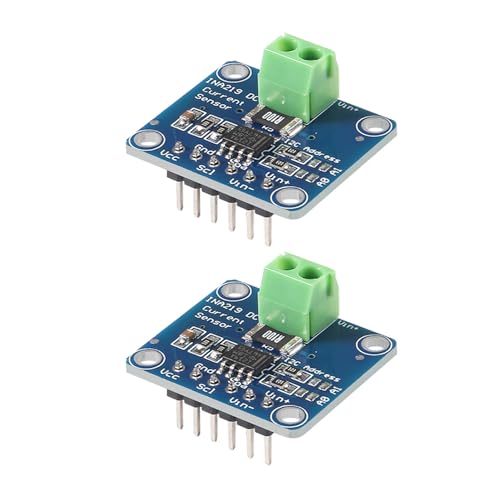
- A single power supply, the operating voltage of between +3.0 to + 5.5V.
- INA219 is small size, not only to monitor the voltage drop across a shunt resistor on the sensing shunt supply voltage, …
- Zero drift 219 INA219 module up to 128 samples can be averaged to achieve filtering in noisy environments.