
An *arr stack Raspberry Pi build turns a Pi 5 into an automated media library: Prowlarr manages your indexers, Sonarr handles TV, Radarr handles movies, a download client fetches the files, and Jellyseerr gives you a clean request page in front of it all. On a Raspberry Pi 5 it runs comfortably in Docker and feeds straight into a Jellyfin server.
This guide covers the roles, the one folder-layout decision that makes or breaks performance, a working compose.yaml, first-run wiring, and how to keep the whole thing off the public internet. These are legitimate library-management tools; what you download with them is your responsibility, so only fetch content you have the legal right to.
Last tested: Raspberry Pi OS Trixie 64-bit | July 2026 | Raspberry Pi 5 (8GB) with NVMe | Docker Compose v2 | Prowlarr, Sonarr, Radarr, qBittorrent, Jellyseerr
Key Takeaways
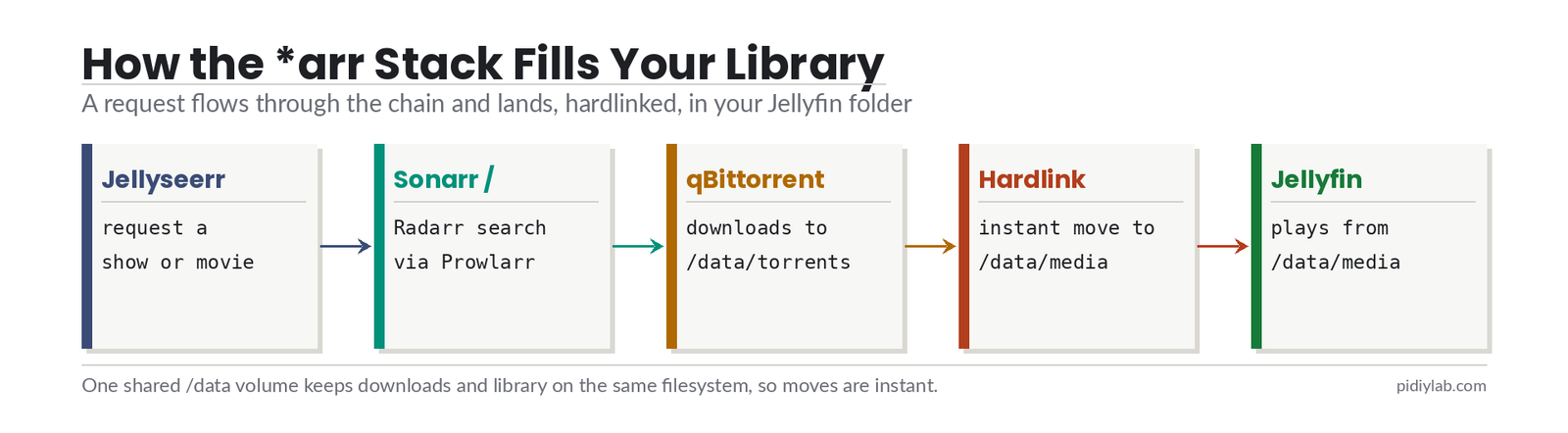
- The pieces work as a chain. Prowlarr holds your indexers and pushes them to Sonarr and Radarr over its API, those two send matches to the download client, then rename and file the results into your library, and Jellyseerr is the request front end. Install them together with one Compose file.
- The single most important decision is the folder layout. Put the download folder and the media library under one shared volume on the same filesystem, so the *arr apps can hardlink and instant-move files instead of slow copy-and-delete. Separate
/tv,/movies, and/downloadsmounts break hardlinks and quietly double your disk use. - Keep it private and legal. Run every container with the same PUID and PGID so they can read each other’s files, never port-forward these web UIs to the internet (use Tailscale for remote access), consider routing the download client through a VPN, and only download content you are entitled to.
What Each App Does
- Prowlarr (port 9696): indexer manager. You add your torrent or Usenet indexers once here, and it syncs them to Sonarr and Radarr automatically.
- Sonarr (8989): watches for TV episodes, sends them to the download client, and files them into the library.
- Radarr (7878): the same, for movies.
- qBittorrent (8080): the download client in this guide. A Usenet client like SABnzbd works the same way in the stack.
- Jellyseerr (5055): a request portal that logs in with your Jellyfin account, so household members can ask for a show or film and Sonarr or Radarr picks it up.
What You Need
- Raspberry Pi 5 (4GB runs the core stack; 8GB gives room for extras like Bazarr or Lidarr)
- Storage for media on a single filesystem: an NVMe SSD or a large USB drive, big enough for downloads plus library
- Docker and the Compose plugin (see the Docker on Raspberry Pi 5 guide)
- A Jellyfin server (or Plex) to point at the finished library
Plan Your Folder Layout First
This is the step people skip and regret. Create one root folder on your media drive and give every container the same view of it. Downloads and the final library live side by side under that root:
/mnt/media/data
├── torrents
│   ├── movies
│   └── tv
└── media
    ├── movies
    └── tv
Every container mounts that one root as /data. qBittorrent saves into /data/torrents, and Sonarr and Radarr use /data/media as their library root. Because both live on the same filesystem, the *arr apps hardlink the finished file into the library instantly, keeping the torrent seeding without using a second copy of the disk space. Point Jellyfin at /data/media and you are done. This layout follows the widely used TRaSH guides; the alternative of separate mounts is what causes slow imports and doubled storage.
The Docker Compose File
Create a project folder, then a .env file beside the compose file for the shared values. Set the timezone and the path to your media root, and find your user and group IDs with id:
# .env
PUID=1000
PGID=1000
TZ=America/Chicago
DATA=/mnt/media/data
Then compose.yaml. Note that Sonarr, Radarr, and qBittorrent all mount ${DATA} at the same /data path, which is what makes hardlinks work:
services:
  prowlarr:
    image: lscr.io/linuxserver/prowlarr:latest
    container_name: prowlarr
    environment:
      - PUID=${PUID}
      - PGID=${PGID}
      - TZ=${TZ}
    volumes:
      - ./prowlarr:/config
    ports:
      - "9696:9696"
    restart: unless-stopped

  sonarr:
    image: lscr.io/linuxserver/sonarr:latest
    container_name: sonarr
    environment:
      - PUID=${PUID}
      - PGID=${PGID}
      - TZ=${TZ}
    volumes:
      - ./sonarr:/config
      - ${DATA}:/data
    ports:
      - "8989:8989"
    restart: unless-stopped

  radarr:
    image: lscr.io/linuxserver/radarr:latest
    container_name: radarr
    environment:
      - PUID=${PUID}
      - PGID=${PGID}
      - TZ=${TZ}
    volumes:
      - ./radarr:/config
      - ${DATA}:/data
    ports:
      - "7878:7878"
    restart: unless-stopped

  qbittorrent:
    image: lscr.io/linuxserver/qbittorrent:latest
    container_name: qbittorrent
    environment:
      - PUID=${PUID}
      - PGID=${PGID}
      - TZ=${TZ}
      - WEBUI_PORT=8080
    volumes:
      - ./qbittorrent:/config
      - ${DATA}:/data
    ports:
      - "8080:8080"
    restart: unless-stopped

  jellyseerr:
    image: fallenbagel/jellyseerr:latest
    container_name: jellyseerr
    environment:
      - TZ=${TZ}
    volumes:
      - ./jellyseerr:/app/config
    ports:
      - "5055:5055"
    restart: unless-stopped
Bring it up from the project folder:
docker compose up -dAfter a minute each app is reachable on your Pi’s LAN address at its port: Prowlarr on 9696, Sonarr on 8989, Radarr on 7878, qBittorrent on 8080, and Jellyseerr on 5055.
First-Run Configuration
Wire the apps together in this order:
- qBittorrent: log in (the container log shows the temporary password on first start), change the password, and set the default save path to
/data/torrents. - Prowlarr: add your indexers, then add Sonarr and Radarr under Settings, Apps, and add qBittorrent under Settings, Download Clients. Prowlarr pushes the indexers out to both.
- Sonarr and Radarr: add qBittorrent as the download client, and set the root folder to
/data/media/tvand/data/media/moviesrespectively. - Jellyseerr: sign in with your Jellyfin account, then connect Sonarr and Radarr so approved requests flow into them.
With that done, a request in Jellyseerr reaches Sonarr or Radarr, which searches the Prowlarr indexers, sends the match to qBittorrent, and files the finished media into /data/media for Jellyfin to show. Add a title as a test and watch it move through the chain.
Access It Safely
None of these web UIs belong on the public internet. Do not forward ports to them. For access away from home, put the Pi on a private network with Tailscale and reach the apps over that, or place them behind a reverse proxy that requires authentication. If you want the web UIs reachable only through that private path and not on the plain LAN, bind each port to localhost by prefixing it with 127.0.0.1: in the compose file. Separately, for torrent privacy, many people route the download client through a VPN container such as gluetun using network_mode: "service:gluetun"; that needs your VPN provider’s details and is worth adding once the basic stack works.
Verify the Stack
docker compose psshows all five containers running.- Prowlarr lists Sonarr and Radarr as connected apps, with indexers synced to both.
- Sonarr and Radarr each show qBittorrent as a healthy download client and their root folder set under
/data/media. - A test title downloads to
/data/torrentsand appears, hardlinked, in/data/mediawithout a long copy. - Jellyseerr signs in with Jellyfin and passes an approved request to Sonarr or Radarr.
Troubleshooting Your *arr Stack Raspberry Pi Setup
Imports are slow or use double the disk. Hardlinks are not working, almost always because the download and library folders are on different mounts. Confirm every container mounts the one ${DATA} root at /data, and that qBittorrent saves inside that same /data tree.
Permission denied on files. The containers are running as different users. Set the same PUID and PGID across all of them, make sure that user owns the media root, and recreate the containers with docker compose up -d.
Prowlarr indexers fail to sync. Check that Sonarr and Radarr were added in Prowlarr with the correct API key and container address (use the container name and internal port, for example http://sonarr:8989, since they share the Compose network).
Jellyseerr cannot reach Sonarr or Radarr. Use the same container-name address and API key, and confirm all services are on the same Compose network, which they are by default in one file.
FAQ
Is the *arr stack legal?
The software is legal. Prowlarr, Sonarr, Radarr, qBittorrent, and Jellyseerr are open-source library-management and download tools with plenty of lawful uses, from organising your own rips to fetching public-domain or freely licensed material. What you download is your responsibility, and you should only acquire content you have the legal right to. Respect copyright and the laws in your country.
Do I need a VPN?
The stack runs without one. For torrent traffic, many people route the download client through a VPN container such as gluetun for privacy, with a kill switch so the client loses internet if the VPN drops. It is optional and independent of the rest of the stack; add it once the basics work.
What is the difference between Sonarr and Radarr?
Sonarr manages TV series and episodes; Radarr manages movies. They are near-identical apps aimed at different media types, and they share the same indexers through Prowlarr and the same download client. Run both if you want TV and films automated.
Can a Raspberry Pi handle the whole stack?
Yes. The core of Prowlarr, Sonarr, Radarr, and a download client runs on about 4GB of RAM, so a 4GB Pi 5 is enough and an 8GB board leaves room for extras like Bazarr for subtitles or Lidarr for music. Fast storage matters more than CPU here.
Does it work with both Jellyfin and Plex?
Yes. The *arr apps just organise files into a folder, so any media server that reads that folder works, including Jellyfin, Plex, and Emby. Jellyseerr is built for Jellyfin and Emby; the equivalent Overseerr is the Plex-focused version of the same request app.
References:
- Servarr wiki (Prowlarr, Sonarr, Radarr): wiki.servarr.com
- TRaSH guides (folder structure and hardlinks): trash-guides.info
- LinuxServer.io container images: docs.linuxserver.io
- Jellyseerr: docs.jellyseerr.dev
About the Author
Chuck Wilson has been programming and building with computers since the Tandy 1000 era. His professional background includes CAD drafting, manufacturing line programming, and custom computer design. He runs PidiyLab in retirement, documenting Raspberry Pi and homelab projects that he actually deploys and maintains on real hardware. Every article on this site reflects hands-on testing on specific hardware and OS versions, not theoretical walkthroughs.
Tested on the hardware and OS noted at the top of this article. July 2026.