


A Credit-Card Computer That Does More Than It Has Any Right To
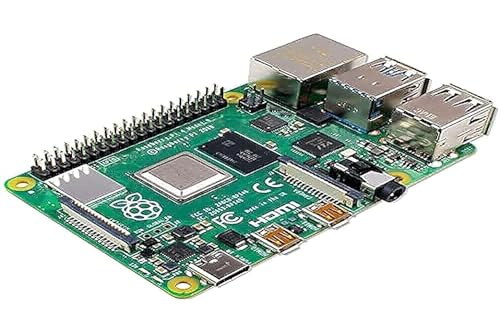
A Raspberry Pi is a low-cost, single-board computer about the size of a credit card. It runs a full Linux operating system, connects to monitors and keyboards like any desktop, and costs between $4 and $80 depending on the model. The Raspberry Pi Foundation built it to make computing education more accessible. Somewhere along the way it became the go-to board for homelab builders, makers, educators, and anyone who wants a cheap computer that can do almost anything.
If you are new to Raspberry Pi, the short answer is this: it is a real computer on a single circuit board, and it is cheap enough to dedicate to a single project without worrying about it. That is the whole point. One Pi runs Pi-hole. Another runs a media server. Another sits in a sensor enclosure outdoors reading temperature data. Each one costs less than a meal out.
This guide covers what a Raspberry Pi actually is, how the models differ, what you can run on one, and which use cases it genuinely suits.
Key Takeaways
- Raspberry Pi is a single-board computer made by the UK-based Raspberry Pi Foundation
- Models range from the $4 Pico microcontroller to the $80 Pi 5 with 8GB RAM
- The Pi 5 uses a quad-core Cortex-A76 CPU at 2.4GHz and a VideoCore VII GPU
- Raspberry Pi OS is the official operating system, based on Debian Linux
- Common uses include home automation, network tools, education, media centers, and IoT projects
- GPIO pins allow direct connection to physical hardware, sensors, and electronics
The Raspberry Pi Foundation and How This Started
The Raspberry Pi Foundation is a UK charity founded in 2009 by staff from the University of Cambridge Computer Laboratory. The original problem they were trying to solve was straightforward: fewer students were applying to computer science programs, and the foundation believed that accessible, hands-on hardware could help reverse that trend.
The first Raspberry Pi shipped in 2012. It had a Broadcom BCM2835 chip, a 700MHz ARM11 processor, and 512MB of RAM. It cost $35. For context, that was cheaper than most textbooks and could run a real operating system. Teachers noticed. Hobbyists noticed. Within months it had sold out repeatedly and built a community the foundation had not fully anticipated.
Since then the lineup has expanded across multiple generations, with each new model bringing better performance, more RAM, and improved connectivity while keeping prices deliberately low. The Pi 5 released in 2023 is roughly three times faster than the Pi 4, and the Pi 5 16GB variant released in 2025 pushes RAM options to a level that was unthinkable for a $80 board not long ago.
The foundation’s commercial arm, Raspberry Pi Ltd, handles manufacturing and sales. In June 2024 the company went public on the London Stock Exchange. The charitable mission and the commercial operation remain separate, with profits from hardware sales supporting educational programs worldwide.
Official Raspberry Pi Models
Raspberry Pi 1 Series (2012 to 2014)
The original lineup established the form factor and the price point that defined everything that followed.
- Model B (2012): The original. 512MB RAM, two USB ports, 100Mbps Ethernet, 700MHz ARM11 CPU.
- Model A (2013): Stripped-down version with 256MB RAM, one USB port, no Ethernet.
- Model B+ (2014): Four USB ports, 512MB RAM, lower power consumption, 40-pin GPIO header.
- Model A+ (2014): Smaller form factor, 256MB RAM, improved audio.
Raspberry Pi 2 (2015)
The Pi 2 Model B was a significant jump: a 900MHz quad-core ARM Cortex-A7 CPU and 1GB of RAM. This was the first model that felt genuinely capable as a desktop replacement for light tasks.
Raspberry Pi 3 Series (2016 to 2018)

The Pi 3 added built-in Wi-Fi and Bluetooth for the first time, which changed how people deployed these boards. No more USB dongles for wireless connectivity.
- Model B (2016): 1.2GHz 64-bit quad-core Cortex-A53, 1GB RAM, Wi-Fi, Bluetooth.
- Model B+ (2018): 1.4GHz CPU, dual-band Wi-Fi, improved Ethernet, Power over Ethernet support.
- Model A+ (2018): Smaller board, 512MB RAM, one USB port, no Ethernet.
Raspberry Pi Zero Series (2015 to 2021)
The Zero line pushed the price floor down dramatically. These are small, low-power boards suited for embedded projects and wearables where a full-sized Pi is overkill.
- Zero (2015): $5 board. 1GHz single-core CPU, 512MB RAM, mini HDMI, micro USB.
- Zero W (2017): Adds Wi-Fi and Bluetooth.
- Zero WH (2018): Zero W with pre-soldered GPIO headers.
- Zero 2 W (2021): Major upgrade: quad-core 64-bit Cortex-A53 at 1GHz, 512MB RAM. Significant performance improvement in a tiny package.
Raspberry Pi 4 (2019)

The Pi 4 was a generational leap. USB 3.0, dual 4K display output over micro HDMI, Gigabit Ethernet, and RAM options up to 8GB. The BCM2711 SoC introduced the Cortex-A72 CPU at 1.5GHz (later raised to 1.8GHz via firmware) and a VideoCore VI GPU at 500MHz. It remains a capable board for most homelab workloads today.
Raspberry Pi 400 and Pi 500 Series
These are keyboard-integrated computers. The board is built directly into the keyboard housing, making them self-contained desktop machines out of the box.
- Pi 400 (2020): Pi 4 hardware in a keyboard, 1.8GHz CPU, 4GB RAM.
- Pi 500 (2024): Pi 5 hardware in a keyboard, 2.4GHz CPU, 8GB RAM.
- Pi 500+ (2025): Pi 500 with 16GB RAM, 256GB NVMe SSD preinstalled, mechanical keyboard switches, and RGB backlighting.
Raspberry Pi Pico Series
The Pico is not a Linux computer. It is a microcontroller board, more comparable to an Arduino than a Raspberry Pi 4. It is designed for embedded electronics projects where you need direct hardware control without the overhead of a full operating system.
- Pico (2021): RP2040 chip, dual-core Cortex-M0+ at 133MHz, 264KB RAM. Starts at $4.
- Pico 2 (2024): RP2350 chip, selectable dual-core Cortex-M33 or RISC-V at 150MHz, 520KB RAM.
Raspberry Pi 5 (2023)
The current flagship. The BCM2712 SoC delivers a quad-core Cortex-A76 CPU at 2.4GHz paired with an 800MHz VideoCore VII GPU. It supports dual 4K displays at 60Hz, PCIe via an M.2 HAT for NVMe storage, and comes in 2GB, 4GB, 8GB, and 16GB RAM configurations. The RP1 southbridge chip, designed in-house by Raspberry Pi, handles USB and GPIO. Active cooling is strongly recommended for sustained workloads.
Compute Module Series
Compute Modules are designed for industrial and embedded applications. They provide the core Pi hardware in a compact SODIMM or edge-connector form factor meant to be embedded into custom carrier boards. The CM5 (2024) is based on Pi 5 hardware and supports up to 16GB RAM.
Technical Specifications by Model
The table below covers CPU speed and RAM across the main consumer models. All Pi models from the Pi 3 onward use 64-bit ARM processors. The Pi 1 and Pi 2 use 32-bit cores.
| Model | CPU Speed | RAM | GPU |
|---|---|---|---|
| Raspberry Pi 1 Model A | 700 MHz | 256 MB | VideoCore IV |
| Raspberry Pi 1 Model B | 700 MHz | 512 MB | VideoCore IV |
| Raspberry Pi 1 Model A+ | 700 MHz | 256 MB | VideoCore IV |
| Raspberry Pi 1 Model B+ | 700 MHz | 512 MB | VideoCore IV |
| Raspberry Pi 2 Model B | 900 MHz | 1 GB | VideoCore IV |
| Raspberry Pi 3 Model B | 1.2 GHz | 1 GB | VideoCore IV |
| Raspberry Pi 3 Model B+ | 1.4 GHz | 1 GB | VideoCore IV |
| Raspberry Pi 3 Model A+ | 1.4 GHz | 512 MB | VideoCore IV |
| Raspberry Pi Zero | 1 GHz | 512 MB | VideoCore IV |
| Raspberry Pi Zero W | 1 GHz | 512 MB | VideoCore IV |
| Raspberry Pi Zero 2 W | 1 GHz | 512 MB | VideoCore IV |
| Raspberry Pi 4 Model B | 1.8 GHz | 1, 2, 4, 8 GB | VideoCore VI |
| Raspberry Pi 400 | 1.8 GHz | 4 GB | VideoCore VI |
| Raspberry Pi 500 | 2.4 GHz | 8 GB | VideoCore VII |
| Raspberry Pi 500+ | 2.4 GHz | 16 GB | VideoCore VII |
| Raspberry Pi Pico | 133 MHz | 264 KB | None |
| Raspberry Pi Pico 2 | 150 MHz | 520 KB | None |
| Raspberry Pi 5 | 2.4 GHz | 2, 4, 8, 16 GB | VideoCore VII |
| Compute Module 5 | 2.4 GHz | 2, 4, 8, 16 GB | VideoCore VII |
The 40-pin GPIO header is present on all full-sized Pi models from the B+ onward. It is the feature that makes physical hardware projects possible, allowing direct connection to sensors, motors, displays, and custom electronics.
Operating Systems
Raspberry Pi OS is the official operating system, maintained by Raspberry Pi Ltd and based on Debian Linux. It ships with a desktop environment, a web browser, Python, and a set of programming tools ready to go. Raspberry Pi Imager handles writing any supported OS image to an SD card or USB drive in a few clicks.
Beyond the official OS, the Pi supports a wide range of alternatives depending on what you are building:
- Ubuntu Server: For those who prefer the Ubuntu ecosystem on a headless server.
- LibreELEC: A stripped-down OS built specifically for running Kodi as a media center.
- RetroPie: Turns a Pi into a retro gaming console with emulators for dozens of classic systems.
- Home Assistant OS: The standard choice for running Home Assistant on dedicated hardware.
- DietPi: A minimal Debian-based OS focused on low resource usage for headless deployments.
- Windows IoT Core: A limited version of Windows for specific IoT applications, supported on Pi 4.
The SD card makes switching operating systems trivial. Flash a different image, swap the card, boot. Many users keep multiple cards on hand for different projects on the same hardware.
What People Actually Use Raspberry Pi For
Education and Learning
This was the original use case and it holds up. The Pi is cheap enough to give to students without worrying about breakage, runs Python and Scratch out of the box, and the Raspberry Pi Foundation provides extensive free curriculum materials. Physical GPIO projects like traffic light simulations and button-controlled programs make programming tangible in a way that screen-only tools cannot match.
Home Lab and Network Tools
This is where the Pi earns its reputation in the enthusiast community. Common deployments include Pi-hole for network-wide ad blocking, Unbound for local DNS resolution, WireGuard VPN servers, network monitors, and print servers. A Pi 4 or Pi 5 running headless consumes very little power and handles these tasks without breaking a sweat. For more on protecting these deployments from storage failures, see Preventing SD Card Corruption on Raspberry Pi.
Home Automation
A dedicated Pi running Home Assistant is one of the most popular homelab projects. The GPIO pins allow direct connection to sensors, relays, and actuators. Combined with Home Assistant’s integration ecosystem, a Pi can serve as the local hub for an entire smart home setup without depending on cloud services.
Media Centers
A Pi 4 or Pi 5 with LibreELEC or Kodi handles 4K video playback and serves as a capable living room media box. The Pi 5 adds hardware AV1 decode support, which covers most modern streaming codecs.
Retro Gaming
RetroPie and Recalbox turn a Pi into an emulation station for classic gaming systems. A Pi 4 handles most systems up through the PlayStation 1 era comfortably. A Pi 5 pushes that further into more demanding emulation territory.
IoT and Sensor Projects
The GPIO header is what separates the Pi from most other small computers. Connecting temperature sensors, cameras, moisture sensors, motion detectors, or relay boards requires nothing more than a few jumper wires and a few lines of Python. The Pi can read sensor data, log it, act on it, and push it to a dashboard, all on one board.
Robotics and Physical Computing
Motor controllers, servo drivers, and HATs (Hardware Attached on Top) designed for robotics plug directly into the 40-pin header. The Pi has enough processing power to handle vision tasks, sensor fusion, and real-time control loops for hobbyist-scale robots.
The GPIO Header
GPIO stands for General Purpose Input/Output. The 40-pin header on full-sized Pi models is a row of pins along the edge of the board that can be programmed to read input signals or output control signals. This is what connects the Pi to the physical world.
Some pins provide 3.3V or 5V power. Others are configurable as digital input or output. Some support I2C, SPI, or UART communication protocols for connecting more complex peripherals. The specific pin layout is consistent across Pi models from the B+ onward, which means HATs and accessories designed for a Pi 3 generally work on a Pi 5.
One important note: GPIO pins operate at 3.3V logic levels. Connecting a 5V signal directly to a GPIO pin will damage the board. Level shifters are required when interfacing with 5V components.


Community and Support
The Raspberry Pi community is one of its genuine strengths. The official forums, the Raspberry Pi subreddit, and dozens of dedicated sites cover everything from beginner setup questions to low-level kernel development. If you are trying to do something with a Pi, someone has almost certainly done it before and written about it.
The Foundation publishes free project guides, curriculum materials, and the official documentation at raspberrypi.com. The MagPi magazine is available free online and covers new projects and tutorials monthly. Most third-party HAT manufacturers publish Python libraries and example code for their hardware.
Stack Overflow, GitHub, and YouTube are all well-stocked with Pi content. The combination of a consistent hardware platform, a stable official OS, and an active community means that getting unstuck on a Pi project is usually a search query away.
FAQ
What is a Raspberry Pi?
What is the difference between a Raspberry Pi and an Arduino?
What operating systems can Raspberry Pi run?
Which Raspberry Pi model should I buy?
What accessories do I need to get started?
Is Raspberry Pi good for beginners?
How much does a Raspberry Pi cost?
Does Raspberry Pi have an SD card problem?
Where to Go From Here
If you are just getting started, flashing Raspberry Pi OS and exploring the GPIO with a basic LED project is still the best introduction to what the hardware can do. From there the path depends on what you want to build.
- For long-running deployments, read Preventing SD Card Corruption on Raspberry Pi before you run into the problem the hard way
- For a significant reliability upgrade, see Booting Raspberry Pi from USB SSD
- For a quick five-minute win on any Pi running from SD card, see Setting Up zram on Raspberry Pi
References
- https://www.raspberrypi.com/products/
- https://www.raspberrypi.com/documentation/
- https://en.wikipedia.org/wiki/Raspberry_Pi