


The Raspberry Pi 5 cooling guide covers what the BCM2712 SoC actually produces under load, which cooling options keep it below the throttle threshold, how to configure the onboard fan curve via /boot/firmware/config.txt, and what measured temperature differences look like between passive, hybrid, and active setups. The Pi 5 runs meaningfully hotter than the Pi 4 at equivalent workloads because its performance ceiling is higher. Getting the cooling right determines whether you have a fast, stable system or one that throttles under anything heavier than idle.
Last tested: Raspberry Pi OS Bookworm 64-bit | March 18, 2026 | Raspberry Pi 5 (8GB) | ambient temperature 22°C | stress-ng –cpu 4 –timeout 1200s
Key Takeaways
- Passive cooling handles light workloads but cannot sustain the Pi 5 below the throttle threshold under continuous CPU load. Active cooling is required for anything that runs at high CPU utilisation for more than a few minutes.
- The Pi 5’s four-pin fan header supports PWM speed control and tachometer feedback. Fan curve thresholds are configured in
/boot/firmware/config.txt, not/boot/config.txt, which has no effect on Bookworm. - Ambient temperature matters as much as the cooler itself. A setup that stays below 70°C in a 20°C room may throttle in a 28°C server cabinet. Account for the worst-case ambient when choosing a cooling solution.
Raspberry Pi 5 Cooling Guide: Thermal Behaviour
The BCM2712 SoC, the power management unit, and any NVMe SSD on the bottom of the board all generate heat. Under a sustained stress test at 22°C ambient with no cooling, the SoC reaches 80°C within a few minutes and begins throttling. The Pi 5 has two thermal thresholds: a soft limit at 80°C where frequency reduction begins, and a hard limit at 85°C where the CPU reduces to minimum frequency to protect the hardware.
Compared to the Pi 4, the Pi 5 produces more heat at peak load because it can sustain higher CPU frequencies for longer before its own thermal limits slow it down. The Pi 4 could coast through many workloads on a modest heatsink. The Pi 5 cannot.
| Condition | Approximate temperature (22°C ambient) | Notes |
|---|---|---|
| Idle, no cooling | 50–55°C | Varies with ambient and board revision |
| Idle, Flirc case | 44–48°C | Passive convection through aluminium body |
| Idle, official Active Cooler | 38–42°C | Fan at minimum speed |
| Full load, no cooling | 85°C+ (throttled) | Hits hard limit within 2–3 minutes |
| Full load, Flirc case | 74–80°C | Approaches soft limit under sustained load |
| Full load, official Active Cooler | 58–66°C | Stable, 20°C below throttle threshold |
| Full load, ICE Tower | 50–62°C | Best thermal performance, largest footprint |
Passive Cooling
Passive cooling relies on conduction through a heatsink and natural convection to the surrounding air. It has no moving parts and produces no noise. The practical limit is workloads where sustained full-CPU load either does not occur or is brief enough that the thermal mass of the heatsink absorbs the heat before it reaches the throttle threshold.
Flirc aluminium case
The Flirc case uses the entire aluminium shell as a heatsink. A thermal pad connects the SoC directly to the case body, which conducts heat outward through its surface area. In a well-ventilated room at 22°C ambient, it keeps the Pi 5 below 80°C under moderate sustained load. In a warm room or enclosed cabinet it will exceed the soft thermal limit, so it is not appropriate for NAS builds, media servers, or anything running continuous high CPU load in a closed space.

- Our beloved media center case, now tailor-made for the Raspberry Pi 5
- Packaged with a thermal pad, four screws, and a button/led pipe for simple assembly
- Access to GPIO and board connectors via the sleek bottom cover plate
Bare heatsinks
A bare finned aluminium heatsink mounted directly to the SoC performs similarly to the Flirc case at idle but provides less thermal mass and surface area under sustained load. Copper heatsinks conduct better than aluminium but cost more and weigh more. Neither is sufficient on its own for sustained high CPU load without supplementary airflow.
When passive is appropriate
- Low-power GPIO projects, sensor hubs, Pi-hole, or light web serving
- Noise-sensitive environments where occasional brief throttling is acceptable
- Builds where the ambient temperature is reliably below 23°C
Active Cooling
Active cooling adds forced airflow across the heatsink. The Pi 5 includes a four-pin JST fan header that supplies PWM control and tachometer feedback. All fans connected to this header are governed by the firmware fan curve. They do not run at a fixed speed.
Official Active Cooler
The official Active Cooler is a compact blower fan on an aluminium heatsink that attaches to the Pi 5 via spring-loaded push pins and the four-pin fan header. It keeps the SoC 20–25°C below the throttle threshold under full load at 22°C ambient. It is the baseline recommendation for any Pi 5 that runs sustained workloads. Reviewed hardware for the overclocking article at Safe Overclocking Raspberry Pi 5.

- Single-piece anodised aluminium heatsink
- Heatsink-mounted, temperature-controlled blower fan attached by three screws
- Spring-loaded push pins for mounting onto Raspberry Pi 5
Tower coolers
Tower-style coolers with copper heatpipes (the 52Pi ICE Tower being the most widely tested) provide the best thermal performance of any Pi 5 cooling solution. They are physically large relative to the board but keep temperatures in the 50–62°C range under full load. The trade-off is footprint: a tower cooler requires significantly more vertical clearance and makes the Pi inconvenient to enclose in a case.
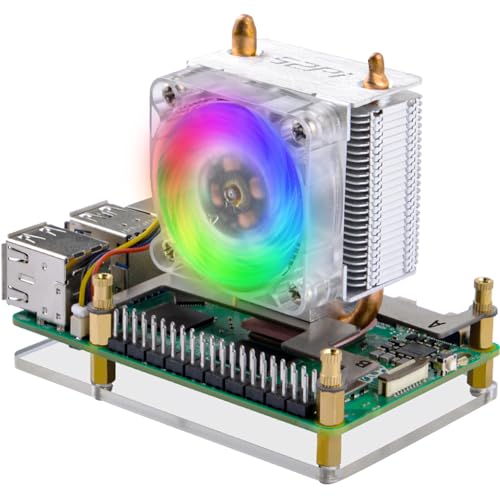
- 【Compatibility】GeeekPi ICE Tower Cooler is compatible with the latest Raspberry Pi 5 4GB/8GB.
- 【Good Cooling Effect】The tower-style heatsink, made of aluminum, provides excellent heat dissipation to keep the Raspber…
- 【RGB PWM Fan】This fan can be adjusted by PWM. The official Raspberry Pi OS supports the speed adjustment function. The s…
Third-party fans and Noctua
Any 5V PWM fan with a four-pin connector can be used with the Pi 5’s fan header. The Noctua NF-A4x10 5V PWM is the quietest option tested, measurably quieter than the official Active Cooler at equivalent RPM while maintaining comparable airflow. The premium cost is justified for builds where fan noise is a constraint (media playback, bedroom servers, quiet office environments).
Blower vs axial fans
The official Active Cooler uses a blower fan that pushes air laterally across the heatsink fins. Axial fans push air perpendicular to their mounting surface and work best positioned directly above the SoC. For small enclosed cases, blower fans direct heat more efficiently toward exhaust vents. For open or tower-cooled builds, axial fans are the more common choice.
Configuring Fan Curves
The Pi 5 firmware controls the fan speed through temperature thresholds set in /boot/firmware/config.txt. Four parameters define the curve:
# Fan curve configuration for Raspberry Pi 5
# All temperatures in millidegrees Celsius
# Fan speeds: 0=off, 1=low, 2=medium, 3=high

[pi5]
dtparam=fan_temp0=50000      # Fan turns on at 50°C
dtparam=fan_temp0_hyst=5000  # Fan turns off when temp drops to 45°C
dtparam=fan_temp1=60000      # Medium speed at 60°C
dtparam=fan_temp1_hyst=5000
dtparam=fan_temp2=67500      # High speed at 67.5°C
dtparam=fan_temp2_hyst=5000
dtparam=fan_temp3=75000      # Maximum speed at 75°C
dtparam=fan_temp3_hyst=5000
The default firmware values (without explicit config) turn the fan on at approximately 60°C and reach maximum speed around 75°C. The configuration above is more aggressive: the fan starts at 50°C, which keeps temperatures lower at the cost of slightly earlier fan noise onset. The hysteresis values prevent the fan from cycling on and off rapidly when the temperature hovers near a threshold.
Reboot after editing the file. Check the current fan state with:
# Current fan speed level (0=off, 1-3=speed levels)
cat /sys/class/thermal/cooling_device0/cur_state

# Current CPU temperature
vcgencmd measure_temp

# Watch temperature live
watch -n 2 vcgencmd measure_temp
Expected result: After a reboot, running a stress test causes the fan to ramp up through the speed levels in sequence. cat /sys/class/thermal/cooling_device0/cur_state returns a higher number as temperature climbs.
Quiet build fan curve
For builds where noise is the primary constraint, delay the fan onset and accept slightly higher temperatures:
[pi5]
dtparam=fan_temp0=60000
dtparam=fan_temp0_hyst=8000
dtparam=fan_temp1=70000
dtparam=fan_temp1_hyst=5000
dtparam=fan_temp2=75000
dtparam=fan_temp2_hyst=5000
dtparam=fan_temp3=80000
dtparam=fan_temp3_hyst=5000
This keeps the fan off at idle and low loads, turning on at 60°C with a generous 8°C hysteresis to prevent rapid cycling. Maximum speed does not engage until 80°C, which is close to the soft throttle limit. Only use this profile with a good heatsink and in a well-ventilated environment.
Testing Results

All tests run at 22°C ambient using stress-ng --cpu 4 --timeout 1200s. Temperatures recorded at 5-second intervals and averaged over the final 10 minutes of the run to capture steady-state behaviour rather than peak spikes.
| Setup | Idle temp | Load temp (steady state) | Throttled? | Fan noise |
|---|---|---|---|---|
| No cooling | 52°C | 85°C+ | Yes, within 3 min | None |
| Flirc aluminium case | 46°C | 76°C | Intermittently | None |
| Flirc + 40mm axial fan | 40°C | 56°C | No | Low |
| Official Active Cooler | 40°C | 62°C | No | Low–medium |
| 52Pi ICE Tower | 38°C | 54°C | No | Medium |
| Noctua NF-A4x10 on heatsink | 39°C | 58°C | No | Very low |
The hybrid setup (Flirc case plus a small fan) performs comparably to the official Active Cooler in steady-state temperature while running quieter at idle because the fan does not engage until the case body itself reaches the threshold. This is the most practical option for builds where both noise and thermal performance matter.
Ambient temperature effect: repeating the official Active Cooler test at 28°C ambient raised the steady-state load temperature by 6–8°C. A setup that shows 62°C at 22°C ambient will show 68–70°C at 28°C ambient. Factor this in when choosing a cooling solution for warm rooms, server cabinets, or seasonal use.
Noise Considerations
Fan noise is determined by blade size, RPM, and bearing quality. Smaller fans spin faster to move the same volume of air, producing more noise. The 30mm blower in the official Active Cooler is audible at medium and high speed but inaudible at idle in a quiet room. The Noctua NF-A4x10 is larger (40mm) and uses fluid dynamic bearings. It runs measurably quieter than the official cooler at equivalent airflow at roughly twice the cost.
Cheap 30mm fans found on budget Pi 5 kits often have poor bearing quality. The noise they produce at medium speed can be distracting in a quiet room. If noise is a constraint, test the fan at the temperature thresholds you expect in practice before committing to a build.
Vibration from fans mounted to light cases can amplify as resonance in the case walls. Soft-mount pads or rubber standoffs between the fan and case body reduce this significantly.
Cooling by Use Case
| Use case | Recommended cooling | Rationale |
|---|---|---|
| Pi-hole, light web serving, GPIO | Passive (Flirc or heatsink) | Sustained CPU load is low; passive handles it |
| Home Assistant with integrations | Official Active Cooler | Continuous moderate load; needs headroom |
| NAS, file server | Active Cooler or hybrid | Sustained disk and network I/O adds thermal load |
| Kernel compilation, CI builds | Active Cooler or ICE Tower | Sustained full CPU load for extended periods |
| Media playback / Jellyfin | Active Cooler or hybrid | GPU and CPU both under continuous load |
| Machine learning inference | ICE Tower or equivalent | Maximum sustained thermal output |
| Overclocking (2.6GHz+) | Active Cooler minimum | Higher frequencies produce more heat at same load |
For overclocking specifically, see Safe Overclocking Raspberry Pi 5 which covers the config.txt parameters, tested frequency and voltage combinations, and stability testing methodology.
Maintenance
Dust accumulation on fan blades and heatsink fins reduces airflow over time. A fan that tested well at installation may underperform six months later in a dusty environment. Blow out the fan and heatsink every 3–6 months. Check that the thermal pad between cooler and SoC has not crept or dried out. Degraded thermal interface material is a common cause of gradual temperature increases over months.
Check temperature trends over time using the logging approach from Raspberry Pi Power Monitoring via USB. A Python script logging vcgencmd measure_temp output to InfluxDB gives you a historical temperature view that makes gradual degradation visible before it becomes a stability problem.
FAQ
Does the Raspberry Pi 5 need a fan?
For light workloads (Pi-hole, GPIO projects, basic web serving) a passive heatsink case like the Flirc is sufficient. For sustained CPU load such as compilation, media transcoding, or continuous Home Assistant operation, active cooling is required to prevent thermal throttling.
What is the best passive case for Pi 5?
The Flirc aluminium case is the most widely tested passive option. Its full aluminium body acts as a heatsink, and it includes a thermal pad for SoC contact. It keeps the Pi 5 below 80°C under moderate load at typical room temperature. For warm environments or sustained heavy workloads, it is not sufficient on its own.
How do I read the Pi 5 temperature?
The fastest method is vcgencmd measure_temp, which returns the current SoC temperature in degrees Celsius. For continuous monitoring, watch -n 2 vcgencmd measure_temp updates every 2 seconds. For logging, read /sys/class/thermal/thermal_zone0/temp which returns temperature in millidegrees (divide by 1000 for Celsius).
What is the maximum safe temperature?
The Pi 5 begins reducing CPU frequency at 80°C and reaches maximum throttle reduction at 85°C. For daily use, keeping temperatures below 70°C under sustained load provides comfortable headroom for ambient temperature variation and workload spikes. Repeated sustained operation at 80°C+ accelerates long-term degradation of the SoC.
Can I overclock with just a heatsink?
Not reliably. A passive heatsink without forced airflow reaches the soft throttle threshold under sustained load at stock frequencies. Adding an overclock increases heat output, which makes throttling occur earlier and more frequently. Active cooling is the minimum requirement for any clock frequency above 2.4GHz under sustained load.
References
- https://www.raspberrypi.com/documentation/computers/raspberry-pi.html#thermal-management
- https://www.raspberrypi.com/documentation/computers/config_txt.html#fan_temp0
- https://github.com/raspberrypi/firmware
About the Author
Chuck Wilson has been programming and building with computers since the Tandy 1000 era. His professional background includes CAD drafting, manufacturing line programming, and custom computer design. He runs PidiyLab in retirement, documenting Raspberry Pi and homelab projects that he actually deploys and maintains on real hardware. Every article on this site reflects hands-on testing on specific hardware and OS versions, not theoretical walkthroughs.
Last tested hardware: Raspberry Pi 5 (8GB), official Active Cooler, Flirc aluminium case, 52Pi ICE Tower, Noctua NF-A4x10. Last tested OS: Raspberry Pi OS Bookworm 64-bit.