

As an Amazon Associate I earn from qualifying purchases. Some links in this guide are affiliate links.
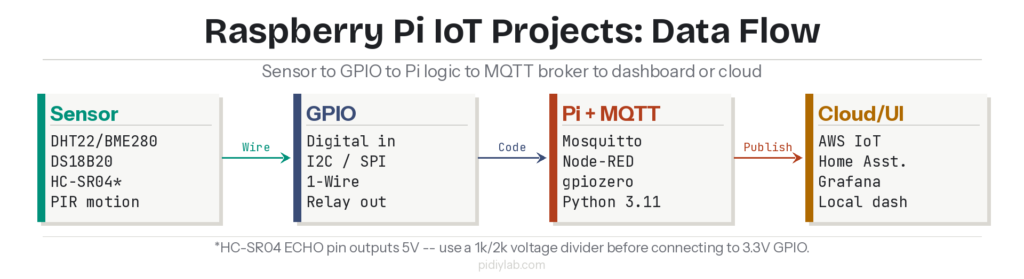
Raspberry Pi IoT projects connect physical sensors to Python logic, publish readings over MQTT, and display results on a local dashboard or push them to a cloud service. The Pi’s 40-pin GPIO header reads digital and analog sensors directly, and Bookworm ships with Python 3.11 and gpiozero ready to use. This guide covers the hardware, the correct Bookworm development setup, five projects worth building, and how to connect them to Mosquitto MQTT and Home Assistant.
Last tested: Raspberry Pi OS Bookworm Lite 64-bit | May 2025 | Raspberry Pi 4 Model B (4GB) and Raspberry Pi 5 (8GB) | Python 3.11, gpiozero 2.0, Mosquitto 2.0, Node-RED 3.1
Key Takeaways
- The HC-SR04 ultrasonic sensor ECHO pin outputs 5V logic. The Raspberry Pi GPIO pins are rated for 3.3V maximum input. Connecting the ECHO pin directly to GPIO without a voltage divider will damage the Pi over time. Use a 1k resistor between ECHO and GPIO and a 2k resistor between that junction and GND before wiring any HC-SR04 to a Pi.
- Install Python sensor libraries inside a virtual environment on Bookworm. Running
pip installwithout a venv fails on Bookworm with an “externally-managed-environment” error. Create the venv first withpython3 -m venv ~/iot-env, activate it, then install libraries. - Google Cloud IoT Core was shut down in August 2023. Any Raspberry Pi IoT tutorial referencing it as a current option is outdated. Current cloud options for Pi IoT projects are AWS IoT Core, Azure IoT Hub, and the self-hosted Mosquitto MQTT broker connecting to Home Assistant or Grafana.
Hardware for Raspberry Pi IoT Projects
The Pi’s 40-pin GPIO header is the connection point for all sensor and actuator work. Digital sensors connect directly to GPIO input pins. Analog sensors require an ADC chip (MCP3008 over SPI is the standard choice) because the Pi has no built-in analog input. I2C sensors like the BME280 use two pins (SDA and SCL). SPI sensors use four pins (MOSI, MISO, CLK, CE). 1-Wire sensors like the DS18B20 use a single GPIO pin with a 4.7k pull-up resistor to 3.3V.
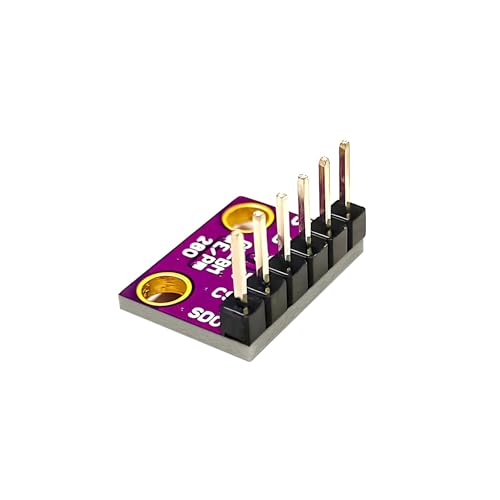
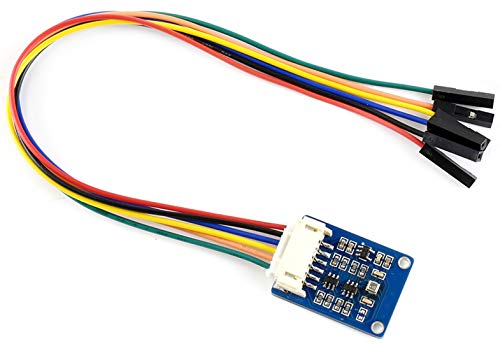
Sensor reference for Raspberry Pi IoT projects: DHT22 measures temperature and humidity over a single digital pin; requires a 10k pull-up to 3.3V. BME280 measures temperature, humidity, and barometric pressure over I2C or SPI; runs on 3.3V, no level shifting needed. DS18B20 measures temperature over 1-Wire; waterproof probes available for soil and liquid. HC-SR04 measures distance via ultrasound; TRIG pin takes 3.3V input, ECHO pin outputs 5V — voltage divider required before connecting ECHO to GPIO. PIR motion sensor outputs 3.3V or 5V digital signal; check module specifications and use a voltage divider if the output is 5V. Soil moisture sensors are analog; require MCP3008 ADC.
HC-SR04 voltage divider wiring (required): Connect TRIG to any GPIO output pin. Connect ECHO to a junction between a 1k resistor (going to GPIO input) and a 2k resistor (going to GND). The GPIO input pin sees 3.3V at that junction instead of 5V. Omitting this divider risks progressive GPIO damage. This is not optional on any Raspberry Pi model.
For actuators, a 5V single or multi-channel relay module connects HVAC, lights, or pumps to GPIO output pins. The relay IN pin is typically active-LOW — use gpiozero’s OutputDevice(pin, active_high=False) to handle this correctly. Servo motors connect directly to a GPIO PWM pin and run on 5V from the Pi’s 5V header pin. For projects needing more GPIO than the Pi provides, the MCP23017 I2C GPIO expander adds 16 additional pins.
Setting Up the Raspberry Pi IoT Development Environment
Flash Raspberry Pi OS Bookworm Lite 64-bit using Raspberry Pi Imager. Set hostname, username, password, SSH, and WiFi credentials in the Imager advanced settings before writing. After first boot, update the system and create the project virtual environment:
sudo apt update && sudo apt full-upgrade -y
sudo apt install -y python3-venv python3-pip git mosquitto mosquitto-clients
python3 -m venv ~/iot-env
source ~/iot-env/bin/activate
Install sensor libraries inside the active virtual environment:
pip install gpiozero adafruit-circuitpython-dht adafruit-circuitpython-bme280 \
            adafruit-circuitpython-mcp3xxx paho-mqtt
Enable I2C and SPI interfaces for sensors that use those buses:
sudo raspi-config nonint do_i2c 0
sudo raspi-config nonint do_spi 0
sudo raspi-config nonint do_onewire 0
Start and enable the Mosquitto MQTT broker so it runs on every boot:
sudo systemctl enable --now mosquitto
mosquitto_sub -h localhost -t "test/#" &
mosquitto_pub -h localhost -t "test/hello" -m "ok"
Expected result: The subscriber terminal prints ok immediately after the publish command. If nothing appears, check systemctl status mosquitto and verify the broker is running. If the broker starts but refuses local connections, Mosquitto 2.0 defaults to localhost-only; add listener 1883 and allow_anonymous true to /etc/mosquitto/mosquitto.conf for local network access, then restart the service.
Five Raspberry Pi IoT Projects Worth Building
These five projects cover the core skills used in every serious Raspberry Pi IoT build: sensor reading, relay control, distance measurement, MQTT messaging, and dashboard visualization. Each one is self-contained but also serves as a building block for larger deployments.
1. Automated plant watering system. Connect a soil moisture sensor (analog, via MCP3008) to read moisture level. Connect a 5V relay to a submersible pump. When moisture drops below threshold, trigger the relay via GPIO to run the pump for a fixed duration. Publish soil readings and pump events to MQTT topics. The core skill is analog sensor reading with threshold logic. See the relay wiring note in the hardware section for the active-LOW relay handling.
2. BME280 weather station with Grafana dashboard. Wire the BME280 to I2C pins (SDA: GPIO2, SCL: GPIO3). Read temperature, humidity, and pressure on a 60-second interval. Publish each reading to a Mosquitto topic. A Node-RED flow subscribes to the topic and writes to InfluxDB. Grafana reads InfluxDB and displays live gauges and historical graphs. This is the most complete IoT pipeline and teaches the full sensor-to-dashboard stack. For the complete Grafana and InfluxDB setup, see Grafana InfluxDB Raspberry Pi: Complete Monitoring Stack Setup Guide.
3. HC-SR04 distance monitor with motion alert. Wire the HC-SR04 with the required voltage divider on the ECHO pin (1k/2k, as detailed in the hardware section above). Read distance every 500ms. If distance drops below a threshold, publish an alert to an MQTT topic and trigger an LED or buzzer via GPIO. Combines digital output (TRIG), level-shifted input (ECHO), relay/LED output, and MQTT alerting in one project.
4. PIR motion detector with MQTT notification. Connect a PIR sensor output pin to a GPIO input. Use gpiozero’s MotionSensor class for clean event-driven callbacks. On motion detected, publish a timestamped JSON payload to an MQTT topic. Subscribe from Home Assistant to trigger automations — a light turning on, a notification to your phone, or a camera snapshot. For the full Mosquitto TLS and ACL security setup required before exposing this to a network, see Mosquitto MQTT Raspberry Pi: Complete TLS and ACL Security Guide.
from gpiozero import MotionSensor
import paho.mqtt.client as mqtt
import json, time

pir = MotionSensor(4)
client = mqtt.Client()
client.connect("localhost", 1883)

def on_motion():
    payload = json.dumps({"motion": True, "ts": time.time()})
    client.publish("home/pir/motion", payload)
    print(f"Motion: {payload}")

pir.when_motion = on_motion
pir.wait_for_no_motion()  # blocks; replace with event loop for production
5. Node-RED IoT dashboard. Install Node-RED and configure a flow that subscribes to all sensor MQTT topics, applies simple transformation logic (unit conversion, rounding), and outputs to a dashboard with gauges, charts, and toggle switches. A Pi running Node-RED as the central MQTT subscriber and dashboard host ties all four projects above into a single interface. For the complete Node-RED setup, see Node-RED Raspberry Pi: Complete Flow Automation and Dashboard Setup Guide.
Cloud Integration and Security for Raspberry Pi IoT Projects
The current cloud options for Raspberry Pi IoT projects are AWS IoT Core and Azure IoT Hub. Both accept MQTT over TLS from a Pi client and provide device management, message routing, and storage. AWS IoT Core is the more common choice in the Pi community because its free tier covers 2.25 million MQTT messages per month and its SDK has a Python client. For most home and small-office Pi deployments, a self-hosted Mosquitto broker connecting to Home Assistant or Grafana is simpler and has no per-message cost. For Home Assistant integration specifically, see Home Assistant Raspberry Pi 5: Complete Supervised Install with NVMe Guide.
Security for any Pi IoT project that publishes to a network requires three steps as a minimum: change the default SSH credentials (done at flash time via Imager), enable UFW with only the required ports open, and configure Mosquitto with a password file and TLS if the broker is reachable outside localhost. A Pi running an open anonymous MQTT broker on a LAN is a common misconfiguration. Any device on the same network can subscribe to all topics and inject arbitrary messages.
# Create Mosquitto password file
sudo mosquitto_passwd -c /etc/mosquitto/passwd piuser

# Add to /etc/mosquitto/mosquitto.conf:
# listener 1883
# password_file /etc/mosquitto/passwd
# allow_anonymous false

sudo systemctl restart mosquitto
Expected result: mosquitto_pub -h localhost -t test -m ok returns a connection error. mosquitto_pub -h localhost -t test -m ok -u piuser -P yourpassword succeeds. Anonymous clients are now blocked.

FAQ
What sensors work best for Raspberry Pi IoT projects?
BME280 for environmental monitoring (temperature, humidity, pressure over I2C), DS18B20 for waterproof temperature sensing over 1-Wire, and DHT22 for combined temperature and humidity where I2C pins are already in use. For distance, the HC-SR04 works but requires a voltage divider on the ECHO pin. For motion, any 3.3V PIR module connects directly to GPIO. Avoid sensors that output 5V logic without a level shifter or voltage divider — the Pi’s GPIO inputs are 3.3V maximum.
Which MQTT broker should you run on a Raspberry Pi?
Mosquitto is the standard choice. It is lightweight, actively maintained, and available via APT on Bookworm. Version 2.0 ships with anonymous access disabled by default, which is the correct security posture. For projects that need message persistence, retained messages, and QoS levels above 0, Mosquitto handles all of these. EMQX is an alternative if you need a web-based management interface, but it is heavier and more complex to configure. For full TLS and ACL setup on Mosquitto, see the dedicated guide linked in the projects section above.
Can Raspberry Pi IoT projects run without internet access?
Yes, and for many deployments that is the correct architecture. A Pi running Mosquitto, Node-RED, InfluxDB, and Grafana operates entirely on the local network with no cloud dependency. Sensors publish to the local broker, Node-RED processes and stores readings, and Grafana serves dashboards to any browser on the LAN. Internet connectivity is only needed if you want remote access or cloud storage. Tailscale provides secure remote access to a local Pi network without opening firewall ports. See Tailscale Raspberry Pi: Complete Secure Remote Access Guide.
Why does pip install fail on Raspberry Pi OS Bookworm?
Bookworm enforces PEP 668, which prevents pip from installing packages into the system Python environment without explicit override. The correct fix is to use a virtual environment: python3 -m venv ~/iot-env, then source ~/iot-env/bin/activate, then pip install as normal. The alternative is adding --break-system-packages to pip commands, which works but bypasses the system package manager and can cause conflicts with APT-installed Python packages. Virtual environments are the correct long-term approach.
How do you connect Raspberry Pi IoT sensor data to Home Assistant?
The standard path is MQTT. Run Mosquitto on the Pi (or on the same machine as Home Assistant). Configure sensor Python scripts to publish readings to MQTT topics. In Home Assistant, add the MQTT integration and configure sensor entities pointing to those topics. Home Assistant subscribes to the topics and updates sensor states in real time. For motion events, use the MQTT binary sensor entity type. For numeric readings (temperature, humidity), use the MQTT sensor entity type with a value template to extract the value from the JSON payload.
References:
- gpiozero sensor documentation: gpiozero.readthedocs.io
- Mosquitto MQTT broker: mosquitto.org/documentation
- Adafruit CircuitPython BME280 library: github.com/adafruit/Adafruit_CircuitPython_BME280
- Node-RED documentation: nodered.org/docs
- AWS IoT Core free tier: aws.amazon.com/iot-core/pricing
About the Author
Chuck Wilson has been programming and building with computers since the Tandy 1000 era. His professional background includes CAD drafting, manufacturing line programming, and custom computer design. He runs PidiyLab in retirement, documenting Raspberry Pi and homelab projects that he actually deploys and maintains on real hardware. Every article on this site reflects hands-on testing on specific hardware and OS versions, not theoretical walkthroughs.
Last tested hardware: Raspberry Pi 4 Model B (4GB) and Raspberry Pi 5 (8GB). Last tested OS: Raspberry Pi OS Bookworm Lite 64-bit. Python 3.11, gpiozero 2.0, Mosquitto 2.0, Node-RED 3.1.