
As an Amazon Associate I earn from qualifying purchases. Some links in this guide are affiliate links.
The Raspberry Pi Trixie changes worth knowing fall into two buckets: the visible refresh (a new Control Centre, a new font and theme, kernel 6.12) and the changes that can break a working setup (the desktop moving fully to the labwc Wayland compositor, Python jumping to the 3.13 series, the APT sources moving to the deb822 format, and a 32-bit ABI change that quietly affects self-compiled software). This is the companion to the step-by-step Raspberry Pi OS Trixie upgrade guide. Here the focus is what actually differs from Bookworm, what tends to break, and how to check what your Pi is running before you commit.
Last tested: Raspberry Pi OS Trixie 64-bit and 32-bit | July 2026 | Raspberry Pi 4 Model B (4GB) and Raspberry Pi 5 (8GB) | kernel 6.12 | compared against Bookworm
Key Takeaways
- Most real breakage lands on 32-bit installs and on anything you compiled yourself. Debian changed the ABI on 32-bit ARM without changing library names, so self-built binaries and some third-party packages need rebuilding, and can fail quietly rather than loudly. If you run 64-bit Raspberry Pi OS with packages from the repositories, you will notice far less.
- The desktop is fully Wayland now, running the labwc compositor. Anything that assumed X11 (some remote desktop tools, screen recorders, window automation like
wmctrlandxdotool) is where graphical breakage shows up. The command line does not care. - Two smaller changes trip up scripts and tutorials: system Python is now the 3.13 series (rebuild your virtual environments), and APT sources moved to the deb822 format, so guides that edit
/etc/apt/sources.listneed updating. Neither is hard once you know.
What Changed in Trixie at a Glance
Trixie rebases Raspberry Pi OS on Debian 13. The headline changes, from most cosmetic to most structural:
- New Control Centre. One application replaces the separate Raspberry Pi Configuration, Appearance, Mouse and Keyboard, Screen, and Printer tools. Launch it from the menu or run
rpcc. Command-lineraspi-configis unchanged. - New look. A new default font (Nunito Sans Light, replacing Piboto), new wallpapers, and refreshed icons.
- Kernel 6.12 LTS. A newer long-term-support kernel across the board.
- Python 3.13. The system Python moves up from the 3.11 in Bookworm.
- deb822 APT sources. The old single
/etc/apt/sources.listgives way to structured.sourcesfiles under/etc/apt/sources.list.d/. - Wayland by default via labwc. Raspberry Pi OS completed its move to Wayland, with labwc as the compositor in place of the older Wayfire.
- The 2038 fix. On 32-bit systems, Debian moved to a 64-bit
time_tto avoid the January 2038 timestamp rollover. This is the root of the 32-bit ABI change below.
One thing that did not change with Trixie: NetworkManager. That switch happened back in Bookworm, so nmcli and nmtui are the same tools you already use.
The Raspberry Pi Trixie Changes That Actually Break Things
Self-Compiled Software on 32-bit (the ABI Change)
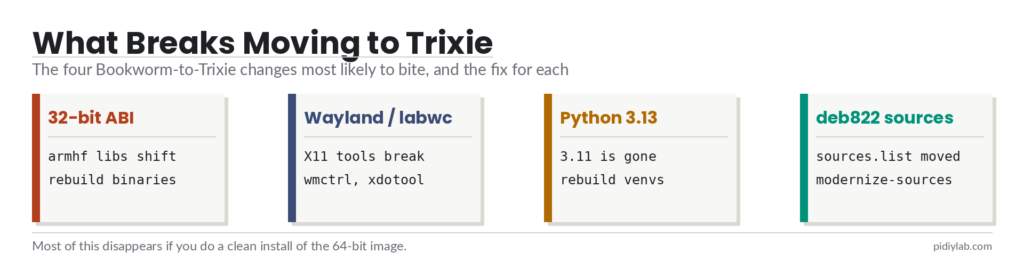
This is the one to take seriously. On 32-bit ARM (armhf), the Debian release notes warn that the ABI of many libraries changed without the library name (soname) changing, as part of the 64-bit time_t move. In plain terms: a binary you compiled against Bookworm libraries can link against Trixie libraries that look compatible but are not, and the failure can be silent, including possible data corruption rather than an obvious crash.
Anything you built from source, or installed as a precompiled 32-bit binary from outside the repositories, should be rebuilt on Trixie and tested. Packages installed normally through apt are already rebuilt for you. This is a strong argument for running 64-bit Raspberry Pi OS, which is not affected in the same way.
X11-Only Desktop Tools Under labwc
With the desktop fully on Wayland via labwc, tools written for the X11 display server may misbehave or do nothing. Common examples are window-automation utilities (wmctrl, xdotool), some screen recorders and screenshot tools, and certain remote desktop or screen-sharing setups that expected an X session. Most have Wayland-native replacements, and the built-in Raspberry Pi screen sharing and screenshot tools already target Wayland. If a GUI utility that worked on Bookworm suddenly does nothing on Trixie, the display server is the first thing to check. A headless, command-line-only Pi is unaffected.
Python Scripts and Virtual Environments
Trixie ships the Python 3.13 series in place of 3.11. A virtual environment built on Bookworm points at the old interpreter and should be rebuilt rather than copied across. Recreate it and reinstall requirements:
python3 -m venv --clear ~/myproject-venv
source ~/myproject-venv/bin/activate
pip install -r requirements.txt
The environment now runs on 3.13 with freshly built packages. The “externally-managed-environment” message you get from a system-wide pip install is not new to Trixie; it has been Debian behaviour since Bookworm, and the answer is the same: use a virtual environment, or --break-system-packages only when you mean it. Watch for packages that pin a maximum Python version, since those can refuse to install on 3.13 until updated.
Third-Party APT Repositories and the deb822 Move
Trixie stores APT sources in the structured deb822 format under /etc/apt/sources.list.d/ rather than the single /etc/apt/sources.list file. Older guides and scripts that append a line to sources.list still work for now, but the modern location is different, and a clean Trixie install may not have the old file at all. To convert an upgraded system to the new format, Debian provides a helper:
sudo apt modernize-sourcesThat rewrites your sources into .sources files and backs up the originals. Separately, any third-party repository that has not published a Trixie release will fail on apt update. Comment it out until the vendor catches up, exactly as you would during the upgrade itself.
HAT and Add-On Support at Launch
At the Trixie release, support for the Raspberry Pi AI Kit and the TV HAT was not yet in place and was listed as coming in the following weeks. If a project depends on a specific HAT or accessory, confirm its Trixie support before moving a Pi that currently does the job. This is a moving target, so check the current state rather than trusting a launch-day list.
Smaller Gotchas Worth Knowing
- Keyboard layout under labwc, multi-user. The Wayland compositor can end up with a different keyboard map than the console, and the fix has to be applied per user account:
sudo raspi-config nonint update_labwc_keyboard. - Touchpad scroll direction. Some users find the scroll direction changed after the update. It is a settings change, not a fault; adjust it in the pointer settings if it feels backwards.
- raspi-config is still here. The graphical settings moved into Control Centre, but the command-line tool and its
nonintscripting interface are unchanged. - The x86 Raspberry Pi Desktop is a separate question. Debian dropped i386 as a full architecture in Trixie. That affects the PC version of the OS, not the ARM images that run on actual Raspberry Pi boards.
How to Check What Your Pi Is Running
Before you decide anything, confirm the release, architecture, and display server on the Pi in question:
cat /etc/os-release          # VERSION_CODENAME=bookworm or trixie
uname -r                     # kernel version (6.12.x on Trixie)
dpkg --print-architecture    # arm64 (64-bit) or armhf (32-bit)
python3 --version            # 3.11.x on Bookworm, 3.13.x on Trixie
echo $XDG_SESSION_TYPE        # wayland or x11
Those five lines tell you almost everything relevant to this article. If dpkg --print-architecture reports armhf, the 32-bit ABI warning applies to your self-compiled software. If echo $XDG_SESSION_TYPE reports wayland, any X11-only GUI tool is a candidate for the display-server problem.
Should You Move, and How
If a Pi is doing a stable job on Bookworm and none of the above matters to you, there is no urgency. Debian supports Bookworm for about two more years and Raspberry Pi will still issue kernel fixes for critical vulnerabilities. When you do move, a clean install of the 64-bit image sidesteps most of the breakage in this article at once: fresh deb822 sources, a rebuilt 64-bit userland, and no leftover 32-bit binaries. The full procedure, including the unsupported in-place route for people who want it, is in the Raspberry Pi OS Trixie upgrade guide. Back up first either way, as covered in the Raspberry Pi backup guide.
Hardware That Makes the Move Easier
- A spare Samsung T7 500GB SSD lets you clean-install Trixie onto new storage and keep the working Bookworm drive as a fallback.
- Raspberry Pi 5 (8GB) and Raspberry Pi 4 Model B (4GB), the boards this was tested on, both run the recommended 64-bit image.
- A Raspberry Pi 5 Active Cooler keeps a Pi 5 cool during long rebuilds and package installs.


FAQ
Should I run 32-bit or 64-bit Raspberry Pi OS on Trixie?
Run 64-bit if your Pi supports it (Pi 3, 4, 5, Zero 2 W, and the 400 and 500 series do). The 32-bit ABI change in Trixie affects self-compiled and third-party binaries on armhf, and 64-bit avoids that class of problem while also lifting the per-process memory limit. Keep 32-bit only for the oldest boards (Pi 1, early Zero) that cannot run the 64-bit image.
Will my Bookworm scripts still work on Trixie?
Mostly yes for command-line scripts, with two things to check. Scripts that call system Python may hit the move from 3.11 to 3.13, so rebuild virtual environments. Scripts that edit /etc/apt/sources.list should be updated for the deb822 layout, or run sudo apt modernize-sources first. Anything that drives an X11 desktop can break under Wayland.
Why did my APT sources.list change or disappear?
Trixie uses the deb822 format, which stores sources as .sources files under /etc/apt/sources.list.d/ instead of one /etc/apt/sources.list file. A clean install may not create the old file at all. Run sudo apt modernize-sources to convert an upgraded system, and look in /etc/apt/sources.list.d/ for the Debian and Raspberry Pi source files.
Is X11 gone in Trixie?
The desktop defaults to Wayland with the labwc compositor, but X11 applications still run through the compatibility layer. What breaks is software that needs direct control of an X session, such as some window-automation and screen-capture tools. If you depend on one of those, check for a Wayland-native version or confirm it works before upgrading.
Do I need to reinstall Python packages after upgrading?
Rebuild virtual environments rather than copying them, because they point at the old 3.11 interpreter and Trixie ships 3.13. Recreate the venv and reinstall from your requirements file. System packages installed through apt are handled by the upgrade; only your own environments and any pip-installed extras need attention.
References:
- Raspberry Pi OS Trixie announcement: raspberrypi.com/news/trixie-the-new-version-of-raspberry-pi-os
- Debian 13 what is new: debian.org/releases/trixie/release-notes/whats-new
- Debian 13 issues to be aware of (32-bit ABI): debian.org/releases/trixie/release-notes/issues
- Raspberry Pi OS documentation: raspberrypi.com/documentation/computers/os.html
About the Author
Chuck Wilson has been programming and building with computers since the Tandy 1000 era. His professional background includes CAD drafting, manufacturing line programming, and custom computer design. He runs PidiyLab in retirement, documenting Raspberry Pi and homelab projects that he actually deploys and maintains on real hardware. Every article on this site reflects hands-on testing on specific hardware and OS versions, not theoretical walkthroughs.
Last tested hardware: Raspberry Pi 4 Model B (4GB) and Raspberry Pi 5 (8GB). Last tested OS: Raspberry Pi OS Trixie, 64-bit and 32-bit, kernel 6.12. July 2026.